

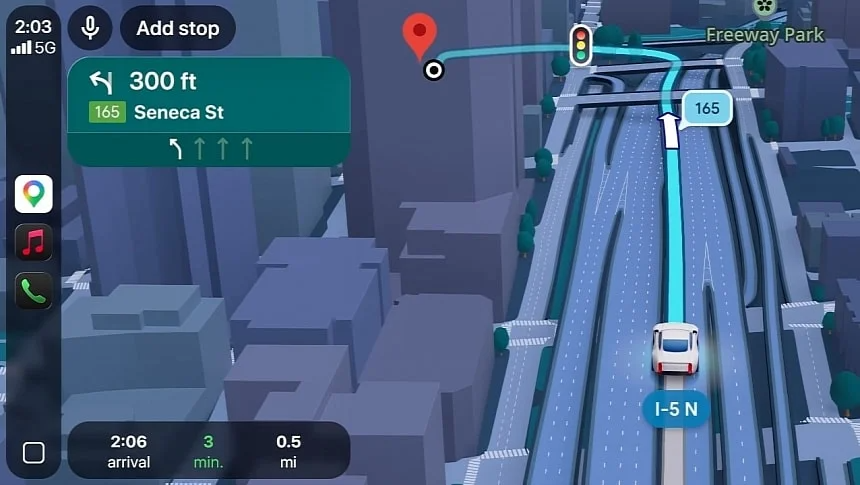
Drivers using Google Maps on Android Auto and Apple CarPlay will soon receive one of the biggest navigation updates in years. Google has announced what it calls the largest Google Maps update in nearly a decade, introducing immersive navigation, smarter guidance, and more detailed maps powered by AI.
This update will significantly improve the navigation experience not only on smartphones but also directly on your car’s infotainment screen through CarPlay and Android Auto.
Immersive Navigation Is Coming to CarPlay and Android Auto
The biggest change coming to Google Maps is something called Immersive Navigation. This feature focuses on making maps more realistic, more detailed, and easier to understand while driving.
In many ways, this new system is similar to the detailed city experience available in Apple Maps, where users can see highly detailed environments including:
- Roads and lanes
- Traffic lights
- Stop signs
- Crosswalks
- Sidewalks
- Trees and medians
- Buildings and terrain
This level of detail makes navigation easier, especially in complex city environments where multiple lanes, exits, and intersections can be confusing.
For drivers using Apple CarPlay or Android Auto, this means clearer navigation and fewer missed turns.
3D Maps, Light and Dark Mode, and Smarter Navigation
Google Maps will also introduce 3D navigation views on Android Auto and Apple CarPlay. These views will include:
- 3D buildings
- Overpasses
- Bridges
- Terrain
- Surrounding environment
To make navigation easier to read, Google Maps will automatically make large buildings transparent when they block your route view. This ensures that your route is always visible and easy to follow.
Another important improvement is smart zoom and map rotation. Google Maps will automatically zoom in or out depending on the situation. For example:
- Zoom in at complex intersections
- Zoom out on highways
- Rotate the map when needed for clarity
This feature is powered by AI and is designed to reduce driver confusion and improve safety.
Better Alternate Route Information
Another useful feature coming to Google Maps on CarPlay and Android Auto is improved alternate route information.
When alternative routes are available, drivers will see more information explaining the differences, such as:
- Time saved
- Traffic conditions
- Road types
- Possible delays
Google calls these route tradeoffs, helping drivers make better decisions when choosing between multiple routes.
In addition, voice navigation instructions will become more detailed, including references to landmarks and surroundings, making directions easier to follow without constantly looking at the screen.
When Will the Update Be Available?
Currently, the new immersive navigation features are only available in the United States, but Google plans to expand the update worldwide over time.
The long-term goal is for the new Google Maps experience to be available on all platforms, including:
- Android smartphones
- iPhones
- Android Auto
- Apple CarPlay
- Android Automotive (Google built-in cars)
So no matter which system your car uses, you should eventually receive the update automatically through Google Maps updates.
Why This Update Matters for CarPlay Users
For drivers using Apple CarPlay retrofit modules, updates like this are very important. They show that navigation apps like Google Maps and Apple Maps are becoming more advanced every year, adding features that previously existed only in expensive built-in navigation systems.
With Apple CarPlay installed in your car, you can always use the latest navigation technology without replacing your car’s original infotainment system.
This is one of the biggest advantages of upgrading your vehicle with a CarPlay module — your navigation system improves over time through software updates.
Upgrade Your Car With Apple CarPlay
If your car doesn’t have Apple CarPlay or Android Auto, you can upgrade your original screen with a plug-and-play CarPlay module from TheCarPlayer, allowing you to use:
- Google Maps
- Apple Maps
- Waze
- Spotify
- Siri voice control
All directly on your original factory display.
This is one of the easiest ways to modernize your car’s infotainment system and always have the latest navigation technology available.
Share:
How to Use Apple CarPlay in a Ferrari F8 Tributo
Good News for CarPlay Users: The ChatGPT Revolution Begins Now With an Official App