

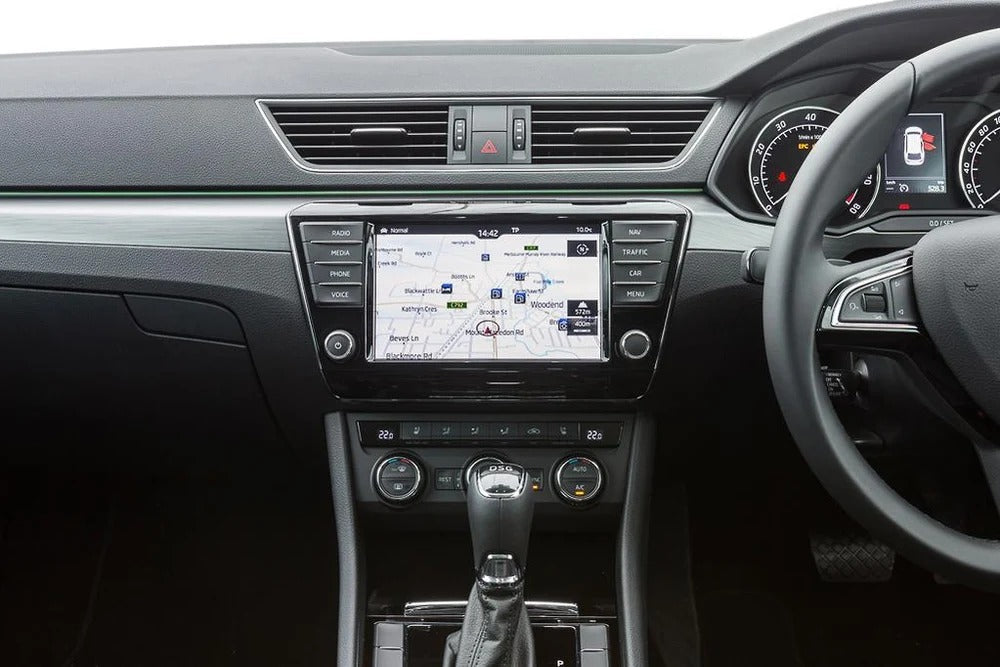
To identify your infotainment system before purchasing a CarPlay module, send us four photos: the screen turned on, the menus displayed, the front of the radio unit, and the connectors at the back if possible. Include your vehicle’s make, model, year, and VIN. This information helps us ensure the best possible compatibility with your vehicle.
Buying a CarPlay module without first checking the compatibility of your infotainment system is a bit like choosing a replacement part with your eyes closed. Every manufacturer, and sometimes every vehicle generation, uses different interfaces. A module designed for a BMW NBT system will not work with a different system, even if both vehicles are from the same manufacturer.
That is why, at TheCarPlayer, we recommend checking your system before placing an order. This step takes barely two minutes and can save you return costs, extended delivery times, and, most importantly, the disappointment of receiving an incompatible product. In this article, we explain exactly which photos to send, how to take them, and which CarPlay solution to choose for your vehicle.
Why Should You Identify Your Infotainment System Before Buying a CarPlay Module?
A CarPlay module integrates directly with your car’s existing electronics. It needs to communicate with the screen, control buttons, and sometimes the vehicle’s central control unit. If the module does not exactly match your original system, integration may fail or, worse, certain functions such as the reversing camera or steering-wheel controls may stop working correctly.
Let’s take a concrete example: BMW vehicles equipped with the NBT system do not have the same architecture as those equipped with the CIC or EVO ID7 system. Two cars from the same manufacturer and model range can require two completely different solutions. Without a precise check, it is impossible to guarantee that the module will be compatible.
By sending us your photos, our team can identify your system’s exact generation within minutes and recommend the right product. This is the most reliable method, much more accurate than simply searching by year or model, since exceptions can arise depending on the vehicle’s original factory options.
What Is the First Photo You Should Send? The Screen Turned On
The first photo to take should show your screen turned on in its usual state, displaying either the home screen or the main menu. This image allows our team to immediately recognize the interface design, screen resolution, and certain visual details specific to each system generation.
Take the photo straight on, in good lighting, and avoid reflections. A simple picture taken with your smartphone is more than sufficient. The goal is to provide a clear, sharp view, not a work of art.
Which Infotainment System Menus Should You Photograph?
Beyond the home screen, navigate through the settings menus and take one or two additional photos. The Settings or System Information menu is particularly useful: it may contain the software version, system reference, or even the exact name of the installed unit.
These details, which are not visible on the home screen, are often decisive when confirming compatibility with a specific CarPlay module. If you do not know where to look, explore the submenus related to Bluetooth, Phone, or Multimedia. These usually contain some of the most useful technical information.
Why Should You Also Photograph the Front of the Radio Unit?
The front of the radio unit, meaning the part visible inside the cabin with its physical buttons, completes the information we need. This photo helps confirm the exact model of the head unit, particularly when several versions share a similar screen but have different control layouts.
Take this photo while standing in front of the dashboard, including the surrounding buttons and the center console if possible. This wider view gives our team a complete picture of the infotainment controls in your vehicle.
Do You Absolutely Need to Photograph the Connectors at the Back of the System?
This fourth photo is not always essential, but it can be extremely valuable in more complex cases. If you can access the back of your radio unit, which may sometimes require partial disassembly, a photo of the connectors helps identify the wiring harness and available ports.
Only attempt this step if you are comfortable carrying out this type of procedure, or if our team specifically requests it after reviewing the first three photos. In most cases, the first three pictures are more than enough to determine your vehicle’s compatibility.
What Additional Information Should You Provide With Your Photos?
In addition to the photos, always provide the following information:
-
Your vehicle’s make
-
The exact model
-
The year of manufacture
-
The VIN (Vehicle Identification Number), which can be found on your vehicle registration documents or on the windshield on the driver’s side
The VIN is particularly useful because it contains precise information about your vehicle’s original configuration, including factory-installed options. Cross-referencing this information with your photos allows us to identify your infotainment system with near certainty.
Which CarPlay Solution Should You Choose for a BMW Equipped With the NBT System?
If your vehicle is a BMW equipped with the NBT system, there is good news: we offer a solution specifically designed for this configuration. The Apple CarPlay module for BMW with the NBT system integrates directly with the original architecture without altering the vehicle’s native interface.
This module retains the BMW user experience you are accustomed to while adding CarPlay features such as navigation, music, calls, and messages. Everything can be controlled by voice or through the screen and supported factory controls.
This is the solution we recommend first for BMW NBT owners because it is designed for this specific configuration, providing optimized compatibility and a straightforward installation.
What If My Vehicle Does Not Have a Dedicated CarPlay Module?
Not every car can benefit from a tailor-made module. If your infotainment system does not match any vehicle-specific solution in our catalog, a universal Apple CarPlay-compatible screen remains an excellent alternative.
This type of screen can be installed in a wide range of vehicles and includes CarPlay functionality without relying on your car’s original infotainment electronics. It is a flexible solution if you are looking for a modern, comprehensive setup, regardless of your vehicle’s age or manufacturer.
The right solution depends on your requirements and your vehicle. If you are unsure which option is suitable, you can explore the products available on TheCarPlayer.com or contact our team for guidance.
How Can You Avoid Ordering Mistakes and Choose the Right CarPlay Solution?
Identifying your infotainment system before buying a CarPlay module is not just an administrative formality: it is essential for ensuring a successful installation on the first attempt. By sending us four simple photos — the screen turned on, the menus, the front of the radio unit, and, if necessary, the connectors — together with your vehicle’s make, model, year, and VIN, you give yourself the best chance of choosing the right solution.
Do you own a BMW equipped with the NBT system? Our dedicated BMW NBT CarPlay module remains the most suitable solution for this configuration. For other vehicles, a universal Apple CarPlay-compatible screen can provide a reliable and adaptable alternative, depending on your requirements.
Do not hesitate to send your photos to our team. After just a few exchanges, you can find out which CarPlay module is best suited to your car.
Contact us at contact@thecarplayer.com if you need help identifying your infotainment system before placing an order.
Frequently Asked Questions
How long does it take to identify my infotainment system?
Once we have received your photos and additional information, our team will generally respond within 24 to 48 business hours with a specific recommendation.
Could I damage my vehicle by taking photos of the connectors?
No, provided you handle the radio unit carefully. If you are not comfortable with this procedure, you can simply send the first three photos: the screen, menus, and front of the unit.
What happens if my vehicle is not compatible with any dedicated module?
In that case, a universal Apple CarPlay-compatible screen is the recommended alternative because it does not depend on your car’s original infotainment electronics.
Is the VIN really essential?
It is not always mandatory, but it significantly speeds up the identification process, particularly for vehicles that have several infotainment system variants depending on their original factory options.
Can I place an order without sending photos first?
We strongly advise against doing so if you are unsure which system your vehicle has. Without checking compatibility, you risk receiving a module that does not integrate correctly with your infotainment system.
Share:
Why Your VIN Number May Be Essential Before Buying a CarPlay Module