

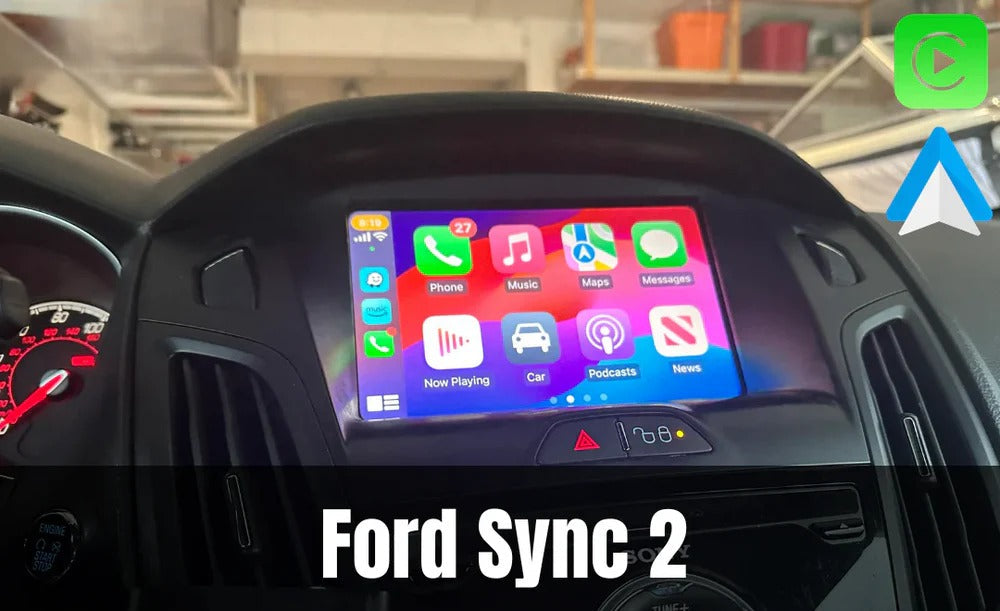
If your Ford Fiesta (2015–2016) is equipped with the original Ford SYNC 2 infotainment system, you can easily add wireless Apple CarPlay and Android Auto without replacing your factory screen. With the plug-and-play Apple CarPlay module from TheCarPlayer.com, you keep your original dashboard, steering wheel controls, factory menus, and reversing camera while enjoying all the benefits of modern smartphone connectivity.
In this guide, we'll explain how to install Apple CarPlay in your Ford Fiesta, how the module works, and why it's the best upgrade for your vehicle.
Why Upgrade Your Ford Fiesta with Apple CarPlay?
The Ford Fiesta remains a fantastic daily driver, but the original SYNC 2 system lacks many of today's essential features.
Without Apple CarPlay, you're forced to use your phone for navigation, music, and messaging, which is both inconvenient and distracting.
By installing a dedicated CarPlay module, you'll instantly gain access to:
- Apple Maps, Google Maps and Waze
- Spotify, Apple Music, Deezer and other streaming apps
- Siri voice control
- Hands-free calling and messaging
- Wireless Apple CarPlay
- Wireless Android Auto
Best of all, everything is displayed on your original Ford touchscreen, giving your Fiesta a factory-quality upgrade.
The Best Apple CarPlay Module for Ford SYNC 2
At TheCarPlayer.com, we offer a dedicated Apple CarPlay & Android Auto module for Ford SYNC 2 that has been designed specifically for Ford vehicles equipped with the original infotainment system.
Unlike aftermarket head units, this module:
- Installs behind the original screen
- Requires no wire cutting or soldering
- Preserves all factory functions
- Supports Wireless Apple CarPlay
- Supports Wireless Android Auto
- Supports factory and aftermarket reversing cameras
The module is configured according to your vehicle's VIN number, ensuring perfect compatibility before it even arrives.
Compatible Ford Models
This module is compatible with several Ford models equipped with the SYNC 2 system, including:
- Ford Fiesta (2015–2016)
- Ford Focus (2012–2015)
- Ford C-Max (2013–2015)
- Ford Mustang (2015–2016)
- Ford Edge
- Ford Explorer
- Ford Fusion
- And many other SYNC 2-equipped Ford models
If you're unsure whether your Fiesta is compatible, simply contact TheCarPlayer.com with your VIN number and we'll confirm compatibility.
How to Install Apple CarPlay in a Ford Fiesta
One of the biggest advantages of this upgrade is how simple the installation process is.
Because the module is completely plug-and-play, no permanent modifications to your vehicle are required.
Step 1 – Remove the Original Screen
Using plastic trim removal tools, carefully remove the dashboard trim surrounding the SYNC 2 display.
Unscrew the screen and gently pull it forward to access the connectors on the rear.
Step 2 – Connect the CarPlay Module
The supplied wiring harness connects directly between the factory connectors and the original display.
Simply plug everything into place and position the module behind the dashboard.
No cutting.
No soldering.
No coding.
Step 3 – Reassemble Everything
Reconnect the screen, reinstall the trim panels and start the vehicle.
You'll now have access to both the original Ford SYNC menu and your new Apple CarPlay interface.
Most customers complete the installation in under one hour using basic hand tools.
If you need assistance, TheCarPlayer.com provides installation support to help guide you through the process.
Wireless Apple CarPlay & Android Auto
One of the biggest improvements over factory systems is wireless connectivity.
Simply pair your phone once and every time you start your Fiesta:
- Apple CarPlay launches automatically
- Android Auto connects automatically
- No USB cable is required
You can immediately access:
- Waze
- Google Maps
- Apple Maps
- Spotify
- Apple Music
- Siri
- Google Assistant
The experience feels exactly like a factory-installed system.
Will I Lose My Original Ford Features?
No.
The module works alongside your original SYNC 2 system rather than replacing it.
You continue to keep:
- Original Ford menus
- Steering wheel controls
- Factory touchscreen
- Factory audio quality
- Factory reversing camera (if equipped)
Switching between the factory interface and Apple CarPlay takes only a single button press.
Add a Reversing Camera
If your Ford Fiesta wasn't originally equipped with a reversing camera, this is an excellent opportunity to add one.
The CarPlay module fully supports aftermarket rear-view cameras, allowing the image to automatically appear on the original display whenever reverse gear is selected.
A discreet HD CCD reversing camera provides:
- Excellent image quality
- Night vision
- Waterproof housing
- Automatic switching when reversing
It integrates perfectly with the CarPlay module, giving your Fiesta an even more modern driving experience.
Why Buy from TheCarPlayer.com?
When you purchase from TheCarPlayer.com, you receive much more than just a CarPlay module.
You also benefit from:
- Vehicle-specific compatibility
- Wireless Apple CarPlay
- Wireless Android Auto
- Plug-and-play installation
- VIN-configured modules
- Professional customer support
- Fast worldwide shipping
- Comprehensive installation assistance
Unlike universal Android head units, our modules preserve the factory appearance and functionality of your Ford while adding the latest smartphone features.
Final Thoughts
If you own a Ford Fiesta with the SYNC 2 infotainment system, adding Apple CarPlay is one of the best upgrades you can make.
Installation is straightforward, completely reversible, and requires no permanent modifications to your vehicle. You'll enjoy modern navigation, music streaming, hands-free communication, and voice control while keeping the original Ford look and feel.
If your Fiesta doesn't already have a reversing camera, you can easily add one at the same time for an even safer driving experience.
Upgrade your Ford Fiesta today with a wireless Apple CarPlay module from TheCarPlayer.com and enjoy all the convenience of a modern infotainment system without replacing your factory screen.
Frequently Asked Questions
Is the Apple CarPlay module compatible with my Ford Fiesta?
The module is compatible with 2015–2016 Ford Fiesta models equipped with the original Ford SYNC 2 infotainment system. If you're unsure, simply provide your VIN to TheCarPlayer.com and we'll verify compatibility.
How long does installation take?
Most installations take 30–60 minutes and require only basic hand tools. The module is fully plug-and-play with no wire cutting or coding required.
Does the module support wireless Apple CarPlay?
Yes. Wireless Apple CarPlay is built in, allowing your iPhone to connect automatically every time you start the vehicle.
Is Android Auto supported?
Yes. The module supports both wireless Android Auto and wireless Apple CarPlay, making it suitable for both iPhone and Android users.
Will I keep my factory steering wheel controls?
Absolutely. All original steering wheel controls, factory menus, audio functions, and the original touchscreen remain fully operational after installation.
Share:
How to Install Apple CarPlay in an Infiniti Q60
How to Disable Waze's New World Cup 2026 Live Score Alerts