

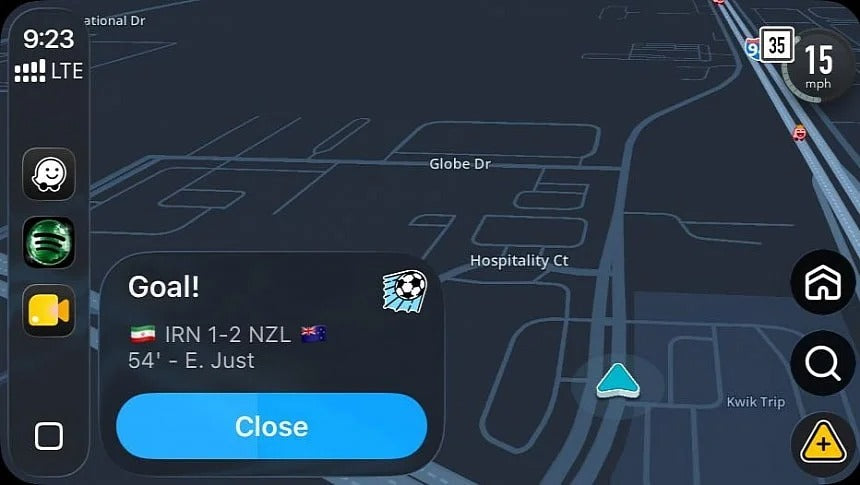
Waze has introduced a new feature for the FIFA World Cup 2026 that displays live match scores directly inside the navigation app. While football fans may enjoy receiving score updates, many drivers have found the feature more distracting than helpful—especially when notifications appear during navigation.
If you're using Apple CarPlay, Android Auto, or the Waze smartphone app, here's how to turn off the new World Cup live score alerts.
Waze Is Now Showing Live World Cup 2026 Scores
To celebrate the 2026 FIFA World Cup, Google has added live football score updates to Waze.
The notifications appear similarly to traffic reports, speed camera alerts, and hazard warnings, allowing drivers to keep up with matches while traveling.
Google originally stated that these score updates would only appear when your vehicle is stopped, making them a relatively unobtrusive addition.
However, many users have reported that the notifications are also appearing while driving, which has raised concerns about unnecessary distractions behind the wheel.
Drivers Are Seeing Match Alerts While Driving
Multiple users have reported receiving live score notifications during active navigation—not just while stopped at traffic lights or parked.
Instead of waiting until the vehicle is stationary, Waze sometimes displays score updates while the vehicle is moving, similar to other navigation alerts.
While the notifications only remain on screen briefly, many drivers would prefer not to receive sports updates while concentrating on the road.
If you're using Apple CarPlay or Android Auto, these alerts will also appear on your vehicle's infotainment display.
How to Turn Off Waze World Cup Live Scores
Fortunately, disabling the feature only takes a few seconds.
Since Waze settings for Apple CarPlay and Android Auto are managed from your smartphone, you'll need to make the change directly within the Waze mobile app.
Follow these steps:
- Open the Waze app on your smartphone.
- Tap Settings.
- Select Alerts & Reports.
- Open Reports.
- Find Live Matches.
- Toggle Live Matches Off.
Once disabled, the World Cup score notifications will no longer appear on your smartphone, Apple CarPlay, or Android Auto.
Will the Feature Disappear Automatically?
Yes.
The live score notifications are tied specifically to the FIFA World Cup 2026 and are expected to disappear once the tournament concludes.
However, if you don't want to see match updates during the competition, it's worth disabling the feature now rather than waiting until the tournament ends.
Apple CarPlay Users Don't Need to Change Anything Else
If you're using Apple CarPlay, there's no need to adjust any settings in your vehicle.
All Waze preferences are synchronized from your phone, so once you've disabled Live Matches in the mobile app, the change will automatically apply to CarPlay as well.
The same applies to Android Auto users.
Enjoy Waze on Apple CarPlay in Any Vehicle
If your vehicle didn't come with Apple CarPlay from the factory, you don't have to miss out on Waze's latest features.
At TheCarPlayer.com, we offer plug-and-play Apple CarPlay and Android Auto retrofit modules for a wide range of vehicles, including:
- BMW
- Audi
- Mercedes-Benz
- Porsche
- Volkswagen
- Jaguar
- Land Rover
- Bentley
- Ferrari
- Lexus
- Alfa Romeo
- Jeep
- And many more
Our modules preserve your factory screen and controls while adding wireless Apple CarPlay and wireless Android Auto, giving you access to Waze, Google Maps, Apple Maps, Spotify, WhatsApp, Siri, and much more.
Final Thoughts
Waze's new World Cup 2026 live score feature is an interesting addition for football fans, but it's not for everyone. If you'd rather focus on navigation without sports updates interrupting your drive, disabling the feature takes less than a minute.
Whether you're using Waze on your smartphone, Apple CarPlay, or Android Auto, turning off Live Matches will prevent these notifications from appearing until you decide to enable them again.
Stay tuned to TheCarPlayer.com for the latest Apple CarPlay, Android Auto, Waze, and in-car technology news.
Share:
How to Install Apple CarPlay in a Ford Fiesta (SYNC 2)
You Can Still Use Apple CarPlay With an iPhone 5 in 2026