

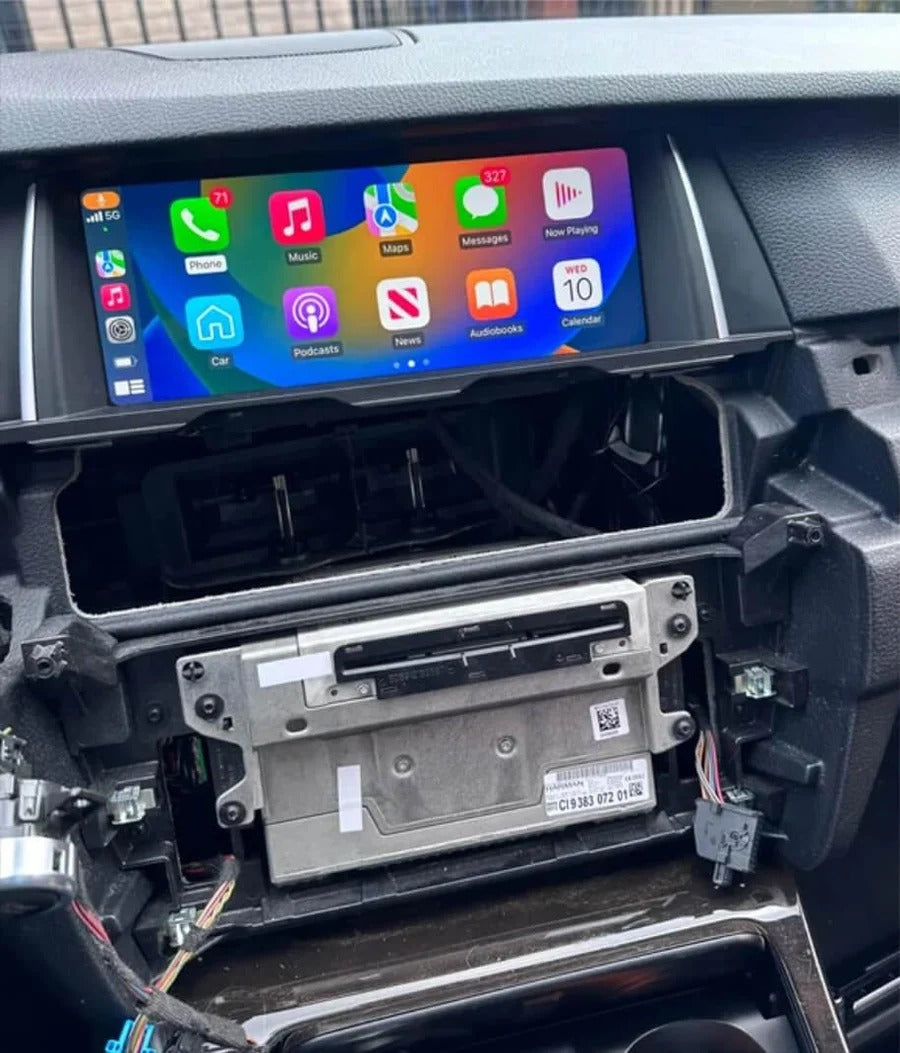
An Apple CarPlay module connects your iPhone to your vehicle’s infotainment system, allowing you to access navigation, music, calls, messages, and compatible apps directly on your car’s original screen. Depending on the type of device, it can add wireless connectivity to existing CarPlay or bring CarPlay functionality to a vehicle that does not have it from the factory.
You may already know the convenience: you get into your car, start the engine, and your screen displays Apple Maps, Spotify, or your messages without having to connect your iPhone manually. But how does this technology actually work?
Understanding how an Apple CarPlay module works can help you choose the right solution for your vehicle, avoid compatibility issues, and decide whether you need a simple wireless adapter or a more advanced retrofit system.
In this guide, we explain how CarPlay modules communicate with your iPhone, how wired and wireless connections differ, and which solution makes the most sense for your car.
What Is an Apple CarPlay Module?
An Apple CarPlay module is an electronic device that enables communication between your iPhone and your vehicle’s infotainment system. Depending on the product, it may connect through an existing USB port, integrate with the wiring behind the factory head unit, or use dedicated video and control connections.
The term CarPlay module can describe several different types of devices:
-
Wireless CarPlay adapter: Converts an existing wired CarPlay connection into a wireless one.
-
CarPlay retrofit module: Adds CarPlay to a compatible vehicle that does not have it from the factory, often while retaining the original screen and controls.
-
Android multimedia adapter: Adds an Android-based interface and extra multimedia functions to certain factory infotainment systems. Some models also support wireless CarPlay.
These products serve different purposes, so it is important to identify what your vehicle already supports before choosing a module.
In many cases, a retrofit module allows you to keep your original display, factory radio, steering wheel buttons, and other existing functions. However, compatibility and available features depend on your vehicle’s model year and infotainment system.
How Does an iPhone Communicate With the Car’s Screen?
When you connect your iPhone to Apple CarPlay, the phone establishes communication with the vehicle’s infotainment system or the installed module.
Your iPhone does most of the work behind the scenes. It runs compatible apps, processes navigation information, and manages features such as Siri, calls, messages, and music playback. The infotainment system displays the CarPlay interface and provides audio output and user input.
The system works in both directions:
-
Your iPhone sends information such as the CarPlay interface, navigation instructions, and audio.
-
The car’s screen displays the interface, allowing you to see maps, music controls, and other supported apps.
-
Your vehicle sends commands back through the touchscreen, rotary controller, or compatible steering wheel buttons.
-
Your iPhone processes those commands and updates what appears on the display.
This exchange happens continuously, making CarPlay feel like a natural extension of your vehicle’s infotainment system.
The exact process varies by vehicle and module. Some retrofit systems use the original display and controls through a dedicated interface, while wireless adapters work with a factory CarPlay system that already supports a wired connection.
How Is Data Transmitted Between the iPhone and the Module?
CarPlay uses either a wired USB connection or a wireless connection. The available method depends on your vehicle and the device installed.
Wired Apple CarPlay
With wired CarPlay, you connect your iPhone to the vehicle using a USB cable. The cable carries the data required for CarPlay and typically charges your phone at the same time.
Wired CarPlay is straightforward and generally reliable when the cable and USB port are in good condition. However, damaged cables, loose connectors, or faulty USB ports can cause intermittent disconnections.
Wireless Apple CarPlay
Wireless CarPlay uses Bluetooth and Wi-Fi together.
Bluetooth is generally used to discover the device and initiate pairing. The iPhone then establishes a Wi-Fi connection to handle the higher data demands of wireless CarPlay, including the interface and audio.
Once the initial setup is complete, the phone can connect automatically when you start your car, provided the vehicle and phone are configured correctly.
The quality of the experience depends on several factors, including the vehicle’s infotainment hardware, wireless signal conditions, software, and the quality and compatibility of the module.
Why Do Some Cars Need a Wireless CarPlay Adapter?
Not every car with factory-installed Apple CarPlay supports wireless connectivity. Many vehicles support CarPlay only through a USB cable, even though their infotainment systems can otherwise work with compatible wireless accessories.
A wireless CarPlay adapter solves this problem by connecting to the car’s existing wired CarPlay USB port. The adapter communicates wirelessly with your iPhone while presenting a wired CarPlay connection to the vehicle.
After the initial pairing, your iPhone can connect automatically whenever you enter the car.
The important distinction is that a wireless adapter does not normally add CarPlay to a vehicle that lacks it. It converts an existing wired CarPlay setup into a wireless one.
If your vehicle already supports factory-installed wired CarPlay and you simply want to stop plugging in your phone, this is usually the simplest solution.
What Is the Difference Between Factory CarPlay, a Wireless Adapter, and a Retrofit Module?
Although these solutions are sometimes described using similar terminology, they serve different purposes.
Factory-installed Apple CarPlay
The vehicle already supports CarPlay through its original infotainment system. Depending on the model, the connection may be wired or wireless. No additional hardware is required for the functionality already supported by the car.
Wireless CarPlay adapter
The vehicle already has wired factory CarPlay, but you want to use it without a USB cable. A compatible adapter adds wireless connectivity without replacing the factory infotainment system.
CarPlay retrofit module
The vehicle does not have factory CarPlay, but its existing infotainment system may support a retrofit solution. A compatible module can add CarPlay while retaining the original screen and, in many cases, factory controls and functions.
Android multimedia adapter
Some advanced adapters run an Android-based system and offer additional apps and multimedia features. Depending on the product and vehicle, these may include video streaming apps or access to an app store, alongside supported CarPlay functionality.
Not every product supports every feature, and compatibility varies by vehicle. In particular, Android-based multimedia adapters are not the same as simple wireless CarPlay dongles.
The Wireless Apple CarPlay Adapter: A Simple Upgrade
If your vehicle already has factory-installed wired Apple CarPlay, a wireless adapter is often the most convenient upgrade.
The Wireless Apple CarPlay Adapter from TheCarPlayer connects to your vehicle’s existing CarPlay USB port and allows your iPhone to connect wirelessly.
Installation is typically straightforward:
-
Connect the adapter to the vehicle’s CarPlay-compatible USB port.
-
Pair your iPhone with the adapter using the on-screen instructions.
-
Allow the connection to establish and use CarPlay as usual.
After the initial setup, the connection generally happens automatically when you start the car.
The main advantage is convenience. You can leave your phone in your pocket or bag while still accessing navigation, music, calls, and other supported CarPlay features through the factory screen.
Before ordering, make sure your vehicle supports factory-installed wired Apple CarPlay. A wireless adapter alone will not add CarPlay to a car that does not already support it.
The CANBUS BOX: More Than Wireless Connectivity
If you want more functionality than a standard wireless adapter provides, TheCarPlayer’s CANBUS BOX offers a different approach for compatible vehicles.
Unlike a basic wireless dongle, this type of multimedia adapter can provide access to an Android-based environment and additional apps on the vehicle’s original screen, depending on the car and product configuration. Supported functions may include apps such as YouTube and Netflix when the vehicle is parked and conditions permit their use.
Compatibility is particularly important with this type of device. Not every factory infotainment system supports the same multimedia adapter, and some vehicles require a model-specific version.
Check the product’s compatibility information before purchasing, especially if you own a BMW or another vehicle with a manufacturer-specific infotainment system.
Choose an advanced multimedia adapter if you want additional entertainment and app functionality. If your only goal is to remove the USB cable, a standard wireless CarPlay adapter is usually the more direct option.
Important: Video playback and other distracting content should only be used when safely parked and in accordance with local laws.
How to Choose the Right CarPlay Solution for Your Vehicle
Before buying a CarPlay module, establish what your vehicle already supports.
-
Your car has factory wired CarPlay: Choose a compatible wireless CarPlay adapter if you want cable-free connectivity.
-
Your car already has wireless CarPlay: You generally do not need a wireless adapter unless you have a specific compatibility or functionality requirement.
-
Your car does not have CarPlay: Look for a vehicle-specific retrofit module or another compatible solution.
-
You want Android apps on the original screen: Consider a compatible Android multimedia adapter rather than a basic wireless dongle.
Check the vehicle’s make, model, year, and infotainment system. Two cars from the same manufacturer can use different hardware, connectors, and software, so a module that works in one model may not work in another.
If you are unsure which product fits your vehicle, contact TheCarPlayer support team before ordering. Providing your vehicle details and a photo of the original infotainment screen can help establish compatibility.
FAQ: How Do Apple CarPlay Modules Work?
Will a CarPlay module replace my original infotainment menu?
Not necessarily. Many compatible retrofit modules retain the factory interface and let you switch between the original system and CarPlay. A wireless adapter normally leaves the original infotainment system unchanged. The exact behavior depends on the product.
How long does installation take?
A wireless adapter usually takes only a few minutes to connect and pair. A retrofit module may require access to the wiring behind the head unit and can take considerably longer, depending on the vehicle and installation requirements.
Will a CarPlay module affect sound quality?
A properly functioning, compatible module should provide normal audio playback. However, sound quality can be affected by the vehicle’s audio system, connection quality, configuration, and the specific device.
Does my vehicle need to support CarPlay already?
A standard wireless CarPlay adapter requires factory-installed wired CarPlay. If your vehicle does not support CarPlay, you will need a compatible retrofit module or another solution designed to add the functionality.
Does a CarPlay module need regular updates?
Update requirements depend on the device. Your iPhone receives iOS updates, while some CarPlay modules may also receive firmware updates to improve compatibility or address bugs. Follow the instructions provided for your specific product.
Can I use a CarPlay module with any vehicle?
No. Compatibility depends on the vehicle’s infotainment system, model year, connections, and the type of module. Always check the compatibility requirements before ordering.
Upgrade Your CarPlay Experience With TheCarPlayer
Apple CarPlay makes it easier to access navigation, music, calls, and messages while driving. The right module can make the experience even more convenient, whether you want to eliminate the USB cable, add CarPlay to a compatible older vehicle, or access additional multimedia features.
If your car already has wired factory CarPlay, a wireless adapter is usually the simplest upgrade. If your vehicle lacks CarPlay or you want more advanced functionality, a vehicle-specific retrofit module or multimedia adapter may be a better choice.
Explore the available solutions at TheCarPlayer.com, and check compatibility before ordering to find the right upgrade for your vehicle.
Share:
Apple CarPlay Won’t Connect via Bluetooth or Wi-Fi? Here’s What to Check