

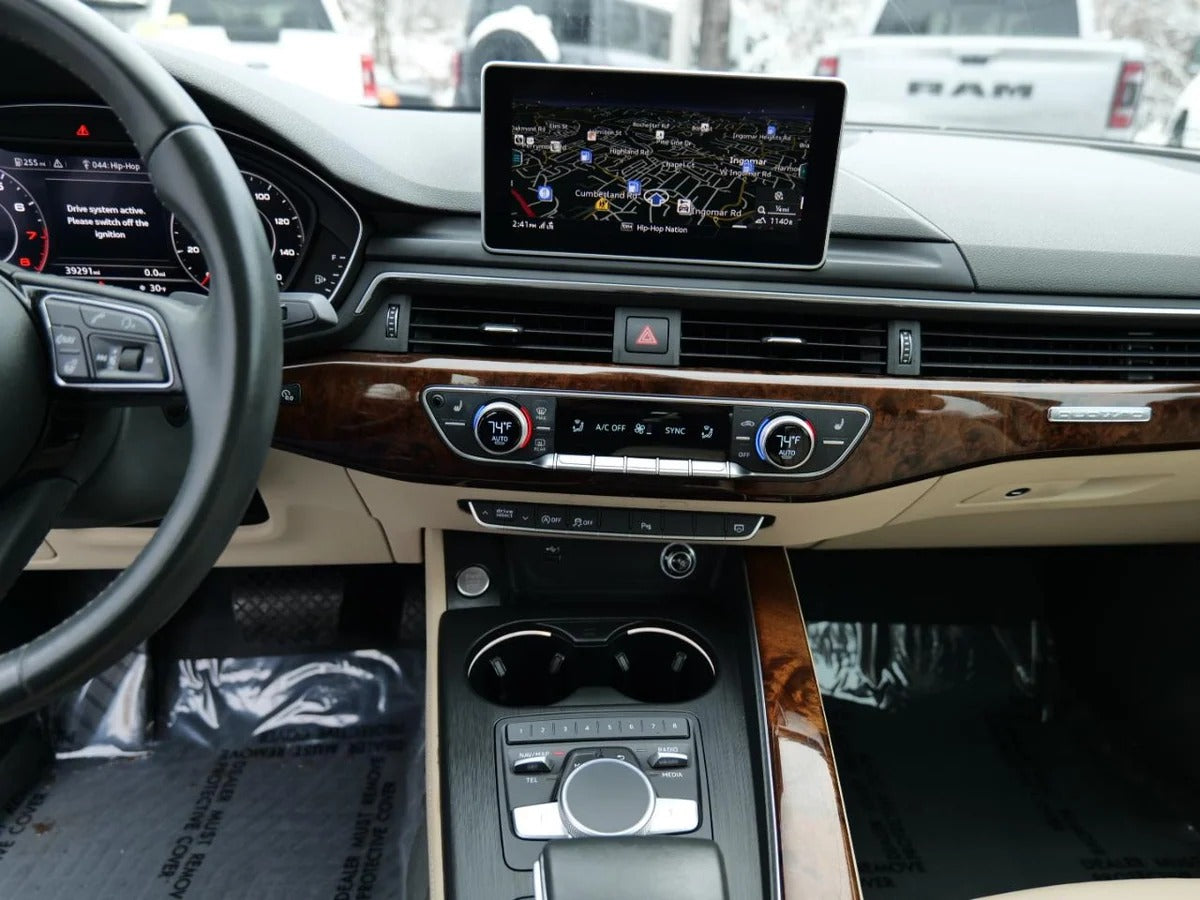
To identify your Audi's MMI system, look at the central screen (its shape, size, and whether it is touchscreen) and the console controls (rotary dial, touchpad, and buttons). Audi models equipped with MMI 3G or MIB2/MIB3 generally feature a larger screen and more modern menus. Identifying your system is essential before purchasing a compatible Apple CarPlay module.
Your Audi's model year and model alone don't tell the whole story. Two Audi A4s manufactured in the same year may have completely different multimedia systems, depending on their trim level, the technology package selected at purchase, or an update carried out at a dealership. As a result, you cannot rely solely on the official technical specifications to determine which MMI system is actually installed in your vehicle.
However, this information is crucial. If you're considering installing Apple CarPlay in your Audi, knowing the exact generation of your MMI system will help you avoid purchasing an incompatible module, wasting time on product returns, or making an unnecessary investment. In this article, we'll show you how to identify your Audi MMI system in just a few minutes, without any special tools, simply by looking at your dashboard.
What Are the Different Generations of Audi MMI Systems?
Audi has developed its MMI (Multi Media Interface) system over several generations, with significantly different technical capabilities from one version to another.
The MMI 2G, found in older models, can be identified by its small retractable screen and relatively basic menus. It does not offer native Apple CarPlay compatibility.
The MMI 3G, introduced later, features a larger screen, integrated GPS navigation and more advanced menus. Some later versions of MMI 3G began incorporating smartphone connectivity options, but they remain limited compared with the following generations.
The MIB (Modular Infotainment Platform), available in MIB1, MIB2 and MIB3 versions, is found in newer Audi models. This is the platform through which Audi gradually introduced native or semi-native Apple CarPlay compatibility. MIB3, in particular, offers a much smoother and more modern multimedia experience, with a high-definition touchscreen and significantly improved response times.
This variety explains why two Audi A4 or Q5 owners may have completely different requirements when it comes to choosing a CarPlay module.
How to Identify Your MMI System by Examining the Screen Menus
The first and most accessible method is to look directly at the menus displayed on your Audi's screen.
Start your vehicle and access the main menu. MMI 3G systems generally display an interface with square icons and a more subdued colour palette, while MIB2 and MIB3 systems feature more modern icons, smoother animations and, in some cases, customizable wallpapers.
Next, go to the "Settings" or "Setup" menu. This is often where you'll find a section dedicated to smartphone connectivity. If an option mentioning Apple CarPlay or Android Auto already appears (even if it is greyed out or locked), this generally means your Audi has an MIB2 or MIB3 system, potentially compatible natively or through an activation module.
If this option is completely absent from the settings, you're more likely to have an older MMI 3G system, which will require an external wireless CarPlay module to add this functionality.
How to Identify Your MMI System Using the Centre Console Controls
Beyond the screen itself, the physical controls on your Audi's centre console provide valuable clues about the generation of your MMI system.
The MMI 3G system is generally operated using a central rotary dial surrounded by shortcut buttons (Menu, Back, Favourites), without a dedicated touchpad. Newer MIB2 systems often add a small touchpad above the rotary dial, allowing you to draw letters or numbers directly with your finger when entering an address or contact.
MIB3, on the other hand, places greater emphasis on the touchscreen itself, sometimes at the expense of the physical rotary dial. On certain models, the dial may even disappear in favour of an entirely touchscreen-based interface, as seen in newer generations of the Audi Q5 and A4.
If your Audi has a responsive touchscreen in addition to the traditional rotary dial, there's a good chance you're equipped with an MIB2 or MIB3 system, which expands your CarPlay compatibility options.
How to Identify Your MMI System Using Your Vehicle's Technical Information
For a more precise identification, go to the "System Information" or "About" menu, usually accessible through your Audi's general settings. This menu generally displays the installed software version, which allows you to determine whether your system is MMI 3G, MIB1, MIB2 or MIB3.
You can also check the system's part number, which may sometimes be available in your vehicle's service booklet or on the purchase invoice. If you're still unsure, an Audi dealership or a professional specialising in automotive connectivity can read this information directly through your vehicle's diagnostic port.
This technical check remains the most reliable method because it eliminates any uncertainty caused by the visual appearance of the interface, which can sometimes be misleading depending on the software updates that have been installed.
Why Should You Check Compatibility Before Choosing a CarPlay Module?
Installing Apple CarPlay in an Audi that does not have it natively requires a specific integration module. However, not all modules are compatible with every generation of MMI system.
A module designed for Audi models equipped with MMI 3G will not work correctly, or may not work at all, in a vehicle equipped with MIB3, and vice versa. The connectors, communication protocols and even activation menus differ between generations. Choosing the wrong module can result in malfunctions, a black screen or an installation that simply isn't possible.
This is why accurately identifying your MMI system using the methods described above is an essential step before making any purchase. This check helps ensure a smooth installation and a seamless CarPlay experience, with integration into your Audi's original screen, responsive voice control and smooth access to your favourite apps.
Which Apple CarPlay Module Should You Choose for Your Audi MMI System?
Once you've identified your MMI system, choosing the right module becomes much easier.
If your Audi A4, A5 or Q5 has a compatible MIB2 or MIB3 system, the Wireless Apple CarPlay module for Audi A4, A5 and Q5 is an ideal solution. Specifically designed for these models, it allows you to connect your iPhone wirelessly, directly to your vehicle's original screen, giving you access to navigation apps, music and messages while driving safely.
If your MMI system is not compatible with this first product, the Apple CarPlay module for Audi MIB3 has been specifically designed for Audi models equipped with the MIB3 platform. It offers the same quality of integration and responsiveness, adapted to this particular generation of multimedia system.
In both cases, you benefit from an installation without complex wiring, smooth access to your apps and native voice control, transforming your dashboard into a fully connected control centre.
Ready to Connect Your Audi with Ease?
Identifying your MMI system is not difficult once you know where to look: the screen, centre console controls and "System Information" menu are generally enough to clear up any uncertainty. Although this step may seem technical, it helps you avoid costly mistakes and ensures you choose the CarPlay module perfectly suited to your Audi.
Your car deserves an interface that matches the capabilities of your smartphone. Identify your MMI system today and discover the compatible Apple CarPlay module for your Audi at TheCarPlayer.com, so you can navigate more intelligently, stay connected on the road and enjoy a truly modern driving experience.
FAQ
How can I tell whether my Audi has MMI 3G or MIB?
Check your Audi's "System Information" menu, which displays the exact software version. Additionally, a responsive touchscreen combined with a touchpad on the centre console generally indicates an MIB2 or MIB3 system, while a rotary dial without a touchpad points towards MMI 3G.
How much does an Apple CarPlay module for Audi cost?
The price varies depending on your Audi model and MMI system generation. The modules available from TheCarPlayer, such as those designed for Audi A4, A5 and Q5 models, offer good value for money and a plug-and-play installation.
Is installing a CarPlay module complicated?
No. Wireless CarPlay modules for Audi are designed for straightforward installation, without major modifications to the vehicle. They connect to the existing ports behind the main head unit.
What happens if I purchase the wrong CarPlay module?
A module that is incompatible with your MMI system can cause a black screen, prevent your iPhone from being detected entirely, or result in voice control malfunctions. Checking your system generation before purchasing helps you avoid these problems.
Does Android Auto work with the same modules as CarPlay in Audi vehicles?
Some modules available from TheCarPlayer support both protocols. However, we recommend checking each product page to confirm Android Auto compatibility with your specific MMI system.
Share:
Which Photos Should You Send to Identify Your Car’s Infotainment System?