

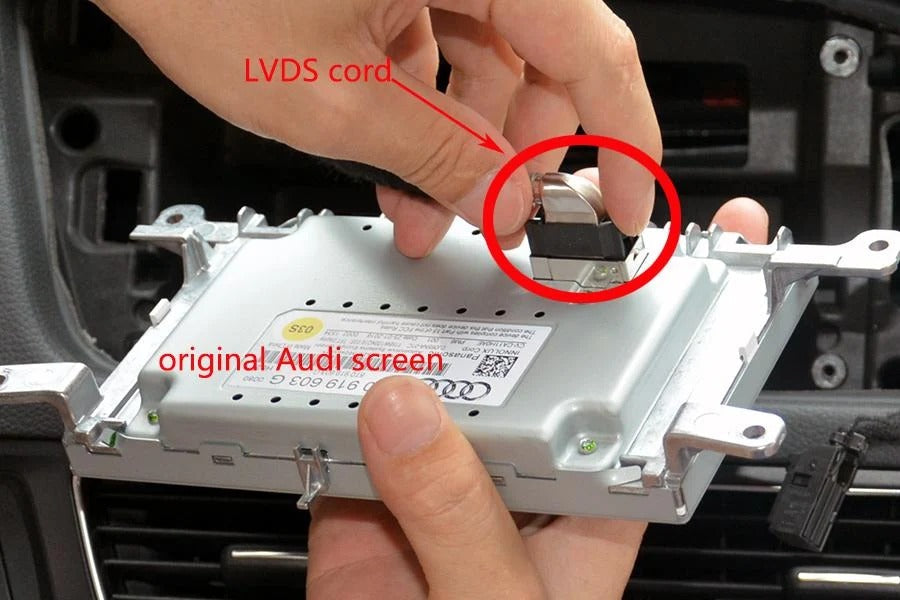
An LVDS cable carries the video signal between a compatible CarPlay retrofit module and your vehicle’s original infotainment screen. Without a properly connected and compatible cable, the screen may remain black, display a distorted image, or fail to switch between the original interface and CarPlay correctly.
When troubleshooting Apple CarPlay, most drivers focus on Bluetooth, Wi-Fi, USB connections, or iOS updates. However, with many vehicle-specific retrofit systems, another component deserves attention: the LVDS cable.
This cable provides an important physical connection between the infotainment system, the CarPlay module, and the original display. Even if your iPhone connects successfully, a problem with the video connection can prevent CarPlay from appearing on the screen.
At TheCarPlayer, we understand the importance of choosing the correct hardware and ensuring that all connections are installed properly. In this guide, we explain what an LVDS cable does, how LVDS IN and LVDS OUT connections work, and what to check if your CarPlay display is not working as expected.
What Is an LVDS Cable?
LVDS stands for Low-Voltage Differential Signaling. It is a technology used to transmit high-speed digital signals while reducing electromagnetic interference.
LVDS is widely used in electronic display systems, including many automotive infotainment systems. It allows video data to travel between compatible electronic components using a dedicated cable and matching connectors.
In a CarPlay retrofit installation, an LVDS cable may connect the original infotainment system to the retrofit module or connect the module to the vehicle’s screen.
Its role is specific: the LVDS cable carries video signals, not the Bluetooth or Wi-Fi connection between your iPhone and CarPlay module.
The exact cable, connector type, and supported display format depend on the vehicle and infotainment system. This is why an LVDS cable designed for one vehicle may not be suitable for another, even if the connectors look similar.
How Does the Video Signal Travel Between the CarPlay Module and the Screen?
To understand the role of LVDS wiring, it helps to look at the main stages involved in displaying CarPlay.
-
Your iPhone sends CarPlay data. Navigation, music, calls, and other supported content are transmitted to the CarPlay system through a wired or wireless connection.
-
The CarPlay module processes the data. The module prepares the CarPlay interface for display.
-
The video signal travels through the display connection. In compatible retrofit systems, LVDS wiring carries the video signal between the relevant components.
-
The original screen displays the image. The screen shows the CarPlay interface when the module is active and the system is configured correctly.
Each stage depends on the relevant connections and components working properly. A problem with the iPhone connection may prevent CarPlay from starting, while an LVDS connection issue may prevent the image from reaching the screen.
This distinction is useful when diagnosing a problem. If your iPhone connects to the module but the display remains black, the LVDS connections may be worth checking, although other causes are possible.
Not every CarPlay device uses LVDS. Simple wireless adapters that convert existing wired CarPlay to wireless generally connect through USB and do not require the same type of video wiring as an integrated retrofit module.
What Do LVDS IN and LVDS OUT Mean?
If you have installed or inspected a vehicle-specific CarPlay retrofit module, you may have noticed two connectors labelled LVDS IN and LVDS OUT.
These labels indicate the direction of the video signal.
LVDS IN: The Original Video Signal
The LVDS IN connection receives the video signal from the vehicle’s original infotainment system.
This allows the retrofit module to receive the original display signal, which can be important for retaining the factory interface and switching between the original system and CarPlay.
LVDS OUT: The Display Signal
The LVDS OUT connection sends the appropriate video signal toward the vehicle’s screen.
Depending on the module’s design, the system can switch between the original infotainment display and the CarPlay interface while retaining access to supported factory functions.
The original interface may remain available when CarPlay is not active, allowing you to continue using compatible vehicle menus and settings.
Important: The precise signal path and switching behavior vary by module and vehicle. Always follow the installation instructions supplied for your specific product rather than relying on the connector labels alone.
Why Do Some CarPlay Retrofit Systems Use Two LVDS Cables?
Many vehicle-specific retrofit modules are designed to integrate with the factory infotainment system without replacing the original screen.
In a typical installation that uses separate LVDS input and output connections, the wiring follows this general arrangement:
-
The original video cable from the vehicle connects to the module’s LVDS IN port.
-
A compatible LVDS cable connects the module’s LVDS OUT port to the vehicle’s display.
This arrangement allows the module to work with the original display while providing the additional CarPlay interface.
The correct cable and connection sequence are essential. A cable connected to the wrong port, an incompletely seated connector, or an incompatible cable can prevent the system from displaying the expected image.
However, not all retrofit systems use the same two-cable configuration. Some vehicles and modules have different wiring arrangements, so check the diagram for your particular installation.
What Happens If an LVDS Cable Is Damaged or Installed Incorrectly?
A faulty, incompatible, or improperly connected LVDS cable can cause several display problems. The symptoms can help narrow down the possible cause.
1. Black Screen
If the screen remains black after installing a CarPlay module, the video signal may not be reaching the display correctly.
Possible causes include:
-
An LVDS connector that is not fully seated.
-
A cable connected to the wrong port.
-
A damaged cable or connector.
-
An incompatible cable or module.
-
A problem with the module, display, or power supply.
A black screen does not automatically mean the LVDS cable is defective. The other connections and the module itself may also need to be checked.
2. Distorted or Flickering Image
A distorted image, flickering display, or unusual visual artifacts can indicate a problem with the video connection.
Check for loose connectors, damaged cables, or an incorrect cable specification. Avoid bending or pulling the cable sharply, as this may damage the cable or its connectors.
3. Intermittent Display
If the image disappears and returns intermittently, a loose connection or damaged cable may be responsible.
In some cases, the problem may instead be related to the module’s power supply, the display, or the vehicle’s infotainment system. A systematic check is more useful than immediately replacing the cable.
4. CarPlay Does Not Appear, but the Original Interface Works
If the original infotainment interface works but CarPlay does not appear, the issue may be related to the module’s configuration, switching function, power connection, or compatibility.
Check that the module is receiving power and that the installation follows the supplied instructions. If the module starts but cannot display CarPlay, inspect the relevant video connections as well.
How to Check LVDS Connections Safely
If you suspect an LVDS connection problem, follow these steps before assuming that the module is defective.
-
Check the installation guide. Confirm which cable belongs in LVDS IN and which belongs in LVDS OUT for your specific module.
-
Inspect the connectors. Look for connectors that are loose, incompletely seated, visibly damaged, or connected to the wrong ports.
-
Check the cable condition. Look for sharp bends, pinching, damaged insulation, or visible connector damage.
-
Verify compatibility. Make sure the cable and module are intended for your vehicle’s infotainment system.
-
Check the module’s power and other connections. A display issue can also result from an incorrect power connection or another installation problem.
-
Test the system according to the installation instructions. Confirm whether the original interface and CarPlay behave as expected.
Before disconnecting or reconnecting cables, switch off the vehicle and follow the manufacturer's safety instructions. Some installations require additional precautions when working around vehicle electronics. If you are unsure how to access the connectors safely, consult a qualified installer.
If the problem persists, take clear photos of the module, the LVDS connections, and the surrounding wiring. These can help a support team identify an installation issue without unnecessary disassembly.
Why LVDS Cable Compatibility Matters
LVDS cables are not universally interchangeable. Different vehicles and infotainment systems can use different connector designs, wiring configurations, and display specifications.
Before purchasing a CarPlay retrofit module, check:
-
Your vehicle’s make, model, and year.
-
The type of factory infotainment system installed.
-
The original screen and its connection type.
-
The module’s compatibility requirements.
-
Whether the correct LVDS cables are included.
Two vehicles from the same manufacturer may use different infotainment hardware, so a module or cable that works in one model may not work in another.
At TheCarPlayer, we offer vehicle-specific CarPlay solutions designed for compatible infotainment systems. If you are unsure which module or cable your vehicle requires, contact our support team before ordering. Providing your vehicle details and a clear photo of the original screen can help us determine which solution is appropriate.
LVDS Cables: A Small Component With an Important Role
LVDS cables may not receive as much attention as wireless connectivity or the CarPlay module itself, but they can play an essential role in vehicle-specific retrofit installations.
A compatible cable and correctly installed connections help the module communicate with the original display while preserving the intended infotainment functionality.
If your CarPlay module powers on but the screen remains black, displays a distorted image, or switches incorrectly between interfaces, checking the LVDS wiring may be a useful part of troubleshooting.
The key is to identify the type of system installed in your vehicle, follow the correct wiring diagram, and verify compatibility before replacing any components.
Explore the available CarPlay solutions at TheCarPlayer.com and check compatibility before ordering to find the right upgrade for your vehicle.
Frequently Asked Questions About LVDS Cables and CarPlay
Is an LVDS cable specific to each vehicle?
Often, yes. Connector types, wiring configurations, and display requirements vary between vehicles and infotainment systems. Always use a cable confirmed to be compatible with your particular module and vehicle.
Can I replace an LVDS cable myself?
It may be possible if you have the correct replacement cable and the installation instructions for your vehicle. However, accessing the connections may require removing interior trim or the infotainment unit. If you are unsure, a qualified installer can help prevent damage.
How long does an LVDS cable last?
An LVDS cable that is compatible and installed correctly can last for many years. Damage, pinching, excessive bending, connector wear, or an incorrect installation can cause problems.
Does an LVDS cable affect Bluetooth or Wi-Fi connectivity?
No. The LVDS cable carries video signals within compatible infotainment installations. Bluetooth and Wi-Fi problems usually involve the wireless connection between the iPhone, the CarPlay module, or the vehicle's infotainment system.
What should I do if my screen stays black after installing a CarPlay module?
Start by checking the installation guide, the LVDS IN and LVDS OUT connections where applicable, and the module’s power supply. Make sure all connectors are correctly seated and that the cable is compatible with your vehicle. If the screen remains black, contact the supplier or a qualified installer for further diagnosis.
Do all CarPlay adapters require LVDS cables?
No. A simple wireless CarPlay adapter typically connects to the vehicle’s existing wired CarPlay USB port and does not require separate LVDS video cables. LVDS wiring is more commonly associated with vehicle-specific retrofit modules that integrate with the original infotainment display.
Share:
How Does an Apple CarPlay Module Work?