

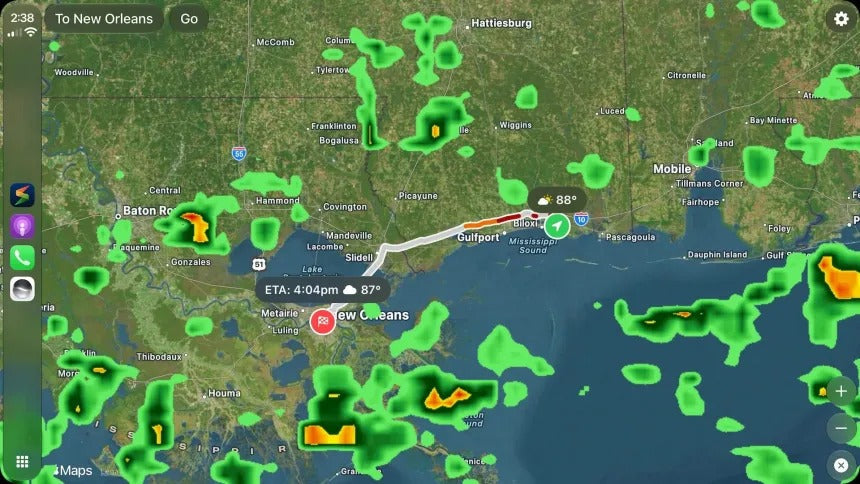
The Weather Channel has brought a new application to Apple CarPlay with its latest update, giving drivers access to weather information, navigation, and alerts directly on their car’s infotainment screen.
The Weather Channel has just updated Storm Radar with support for Apple CarPlay, bringing key weather features right to the large screen on your dashboard.

Version 4.0.19, now available on the App Store, includes an impressive changelog that starts with support for CarPlay.
The application provides a preview of the weather you are expected to encounter along a configured route, while the company also advertises turn-by-turn navigation with automatic rerouting.
One of the best features brought by Storm Radar to CarPlay is support for weather alerts. The Weather Channel explains that when you drive to your destination, the application continuously refreshes its data in the background, showing weather alerts if anything changes in a region included in your route.
You’ll get an alert, so you’ll know in advance if you’re expected to encounter anything like heavy rain, snow, or other severe weather conditions.
While the addition of CarPlay helps expand the weather app category in the car — which, by the way, still doesn’t include Apple’s own Weather app — this new update also brings major changes for iPhone users.
One of the highlights is support for Lock Screen widgets. The application supports multiple types of widgets, including current conditions, a 12-hour forecast, a gauge with different options, and next-hour rain.
There are many other new features for iPhone, iPad, and Mac users, including a 72-hour global radar and smoke information for the Wildfire layer.
CarPlay Is Getting More Apps
The number of apps available on CarPlay keeps growing, and Apple is working on expanding the list of categories supported in the car. One of the most recently unlocked categories is video, as CarPlay allows users to watch video content on their infotainment screens if developers — and carmakers — enable the feature.
Integrating video support into the driving experience has become a priority for both Apple and Google, especially as these applications are expected to offer a safe experience when vehicles are not in motion.
On Android Auto, video apps only work when the car is parked, and the video turns to audio-only when motion is detected.
This means that you can watch a video on YouTube or another supported application while parked, but the moment you begin driving, the application restricts the video and switches to an audio-only mode. For YouTube, this feature requires a Premium subscription, as background audio is not available in the free tier.
Apple will likely adopt a similar configuration, as this is the only safe way to enable video in the car without turning the feature into a major distraction behind the wheel.
For CarPlay users, the arrival of Storm Radar is another example of how Apple's in-car platform is gradually becoming more capable, with developers adding applications that go beyond traditional music, messaging, and navigation.
How to Get Storm Radar on CarPlay
Storm Radar is already available with CarPlay support, and the only thing you need to do is update the application to the latest version in the App Store.
Once updated, you should see the Storm Radar icon appearing on your CarPlay app screen. Connect your iPhone to your vehicle and you can access the application directly from your car’s infotainment display.
Share:
Will the iPhone Ultra Be Compatible With Apple CarPlay?
iPhone 18 Is Here, and There's Good News for CarPlay