

Apple CarPlay is known for its stability—but even the best systems aren’t immune to bugs.
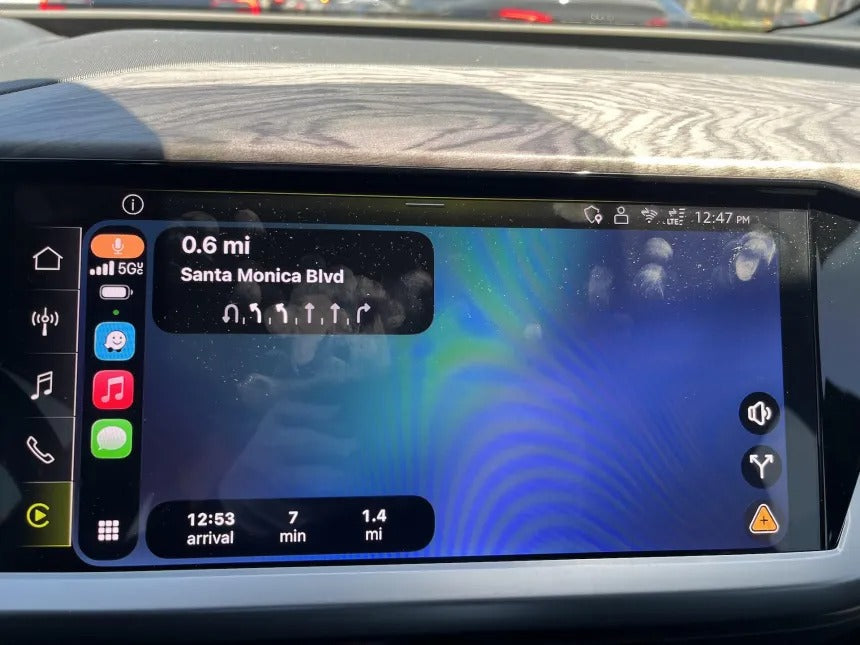
A growing number of users are reporting a frustrating issue with Waze on CarPlay: a full blue screen that makes the app completely unusable.
The “Blue Screen of Death” Hits Waze

The bug has quickly gained attention online, with multiple users describing a scenario where Waze suddenly turns into a solid blue screen—similar to the infamous Windows “Blue Screen of Death.”
When this happens:
- Navigation disappears
- The map won’t load
- The app becomes unusable
👉 In short: no navigation when you need it most.
What’s Causing the Issue?
Reports suggest the problem appears after updating to recent iOS versions, including iOS 26 updates.
The most common trigger:
- Open Waze on CarPlay
- Switch to another app (Spotify, Phone, etc.)
- Return to Waze
- ❌ Blue screen appears
However, not all users are affected—indicating this could be a version-specific or device-specific bug rather than a universal issue.
Other Waze Issues on CarPlay
Alongside the blue screen bug, users have noticed additional glitches:
- Vehicle icons resetting to the default arrow
- Settings not saving properly
- Minor UI inconsistencies
While these issues are less severe, they highlight ongoing stability problems with recent updates.
Temporary Fixes (Workarounds)
Until an official fix is released, here are the most effective solutions:
✅ Force Close the App
- Close Waze on your iPhone completely
- Reopen it
➡️ This usually restores the map temporarily
✅ Avoid Switching Apps
- Stay in Waze full-time while navigating
➡️ Switching apps seems to trigger the bug
✅ Use CarPlay Dashboard Mode
- Run Waze in split-screen (dashboard view)
➡️ Reduces the chance of the blue screen
Is Apple CarPlay the Problem?
Short answer: No.
This appears to be a Waze-specific issue—not a limitation of Apple CarPlay itself.
CarPlay remains one of the most stable and reliable in-car platforms, especially compared to alternatives like Android Auto, which historically faces more frequent connection and performance issues.
What Should You Do Now?
👉 Keep automatic updates enabled
👉 Update Waze as soon as a new version is released
👉 Use temporary workarounds if needed
Google is likely already aware of the issue, and a fix should arrive soon.
Upgrade Your Car for the Best CarPlay Experience
Even with occasional app bugs, Apple CarPlay remains the best way to use navigation, music, and apps safely while driving.
If your car doesn’t support CarPlay, you’re missing out on features like:
- Waze, Google Maps, and live navigation
- Music apps like Spotify and Apple Music
- Hands-free communication
- A modern, distraction-free interface
At TheCarPlayer.com, we offer plug & play Apple CarPlay modules for:
- BMW
- Audi
- Mercedes-Benz
- Porsche
- Ferrari
- Land Rover / Range Rover
- Volkswagen
- Lexus
- Bentley
- Alfa Romeo
- Jeep
👉 Easy installation. No coding. Full integration with your original screen.
Conclusion
The Waze blue screen bug is frustrating—but temporary.
While it may disrupt your navigation experience, it doesn’t change the bigger picture:
👉 Apple CarPlay remains the most reliable and user-friendly in-car system available today.
And with regular updates, issues like this are typically resolved quickly.
Share:
Apple CarPlay Wins Again: iPhone Loyalty Hits Record 96.4%
It’s Not Just Android Auto: Latest iOS Update Breaks Apple CarPlay