

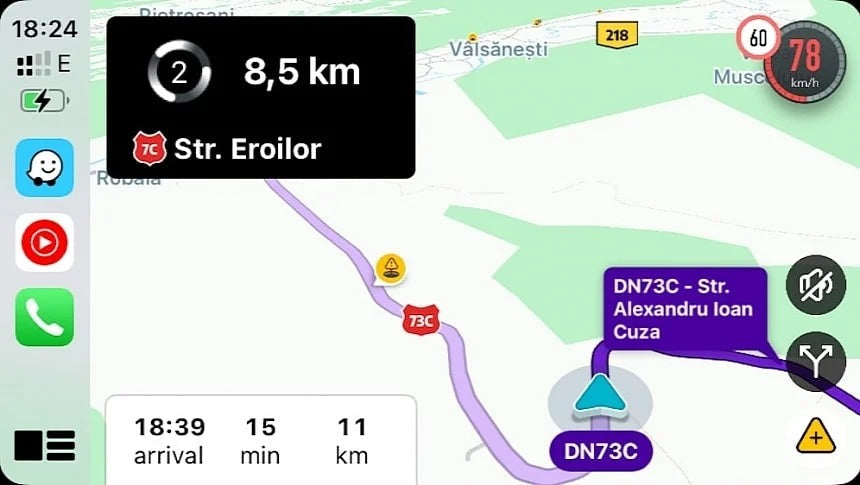
Waze has started rolling out a new Sudden Slowdown alert on Android, iPhone, Android Auto, and Apple CarPlay. The feature warns drivers when they are approaching the back of a traffic jam, giving them more time to slow down and react to congestion ahead.
Waze has been showing traffic jams on its map for years, and real-time traffic information remains one of the navigation app's biggest advantages. However, the new Sudden Slowdown alert takes this a step further by actively warning drivers when they're approaching a traffic queue.
The feature was previously available in beta and is now making its way to users on supported platforms.
Waze Can Now Warn You Before You Reach a Traffic Jam
Seeing a traffic jam on the map is useful, but it doesn't always give you enough time to react, especially when you're traveling at highway speeds.
That's where Waze's new alert comes in.
When Waze detects that you're approaching a significant traffic slowdown, a notification appears on the screen telling you that a sudden slowdown is ahead. The alert also shows an indicator with the approximate distance to the traffic jam.
The idea is simple: give drivers more time to reduce their speed before reaching the end of the queue.
The traffic jam itself continues to appear on the map using Waze's familiar color-coded traffic system. For example, red indicates heavy traffic.
The new alert doesn't add another permanent marker to the map. Instead, it provides an additional warning at the point when it is most useful.
And because the feature is available through Apple CarPlay and Android Auto, drivers can see the warning directly on their vehicle's infotainment display.
Sudden Slowdown Alerts Are Designed to Prevent Hard Braking
Sudden traffic slowdowns can be particularly dangerous on highways and other roads where vehicles are traveling at higher speeds.
A driver approaching the back of a traffic queue may need to brake aggressively if they don't notice the congestion ahead in time. That can increase the risk of a collision, particularly when traffic is already heavy.
Waze's new warning is designed to give drivers additional time to react and reduce their speed gradually.
It's not a completely new concept in navigation. TomTom, for example, has offered similar functionality with its Jam Tail Warnings, which help drivers identify the end of a traffic jam.
The underlying idea is the same: knowing what's happening further ahead gives drivers more time to react.
How Does Waze Generate the Alerts?
Sudden Slowdown alerts are generated automatically using Waze's traffic data.
Drivers don't need to manually report a traffic jam for the alert to appear. When Waze detects congestion ahead, it can automatically display the warning when you approach the affected area.
The feature is available across:
- iPhone
- Android
- Apple CarPlay
- Android Auto
The CarPlay integration is particularly useful because the warning appears on the vehicle's screen, where you're already looking for navigation information.
How to Disable Sudden Slowdown Alerts
If you don't want Waze to display these notifications, you can turn them off from the app.
On your smartphone, open Waze and go to:
Settings → Alerts & reports → Reports → Sudden slowdown
The feature is enabled by default and is set to Alert while driving.
Tap Sudden slowdown and disable the alert.
If you're using Waze through Apple CarPlay or Android Auto, the setting is controlled through the Waze app on your smartphone. Once disabled, the alerts should also disappear from your vehicle's infotainment screen.
Don't See the New Waze Alert Yet?
The Sudden Slowdown feature is being rolled out gradually, so not every Waze user will necessarily have access to it immediately.
If you don't see the option, make sure you're running the latest version of Waze available through the App Store or Google Play.
In testing, the feature is available on Waze 5.24.5.1 for iPhone, with Sudden Slowdown notifications appearing both on the iPhone and through CarPlay.
As with many server-side Waze features, however, having the latest app version doesn't necessarily guarantee immediate access.

Waze Is Adding More Warnings Designed to Give Drivers More Time to React
The Sudden Slowdown alert is part of a broader trend in Waze.
Over the past few years, the navigation app has added several features designed to give drivers more information before they reach potentially problematic situations.
For example, Waze can warn drivers when they are approaching a changing speed limit. Instead of discovering the new speed limit at the last moment, the warning gives drivers additional time to adjust their speed.
Waze can also provide warnings when lanes are merging, allowing drivers to pay closer attention to surrounding traffic and prepare for the upcoming road layout.
These features have something important in common: they don't simply tell you where you are going. They try to tell you what is about to happen on the road ahead.
That's particularly valuable when using CarPlay, where navigation information is displayed directly in front of the driver on the vehicle's infotainment system.
Waze vs. Google Maps: Is Google Still Supporting Both?
The continued development of Waze also raises a question that has been around for years: Is Google eventually going to replace Waze with Google Maps?
For now, Waze's continued rollout of navigation-specific features suggests there is still plenty of room for the two apps to coexist.
Google Maps is a much broader mapping platform, combining navigation with places, businesses, reviews, public transportation, and other location-based services.
Waze, meanwhile, remains heavily focused on driving and real-time road information.
That doesn't mean the two platforms operate completely independently.
Google has increasingly brought some Waze-style reporting features to Google Maps, including incident reports for accidents, traffic jams, roadworks, and other hazards.
Google Maps also uses some Waze-sourced information, including reports relating to police and speed traps.
This makes sense given that both products belong to Google. Data and features that improve navigation can potentially benefit users of both platforms.
Waze Still Has More Driver-Focused Reports
Google Maps has continued to expand its incident-reporting capabilities, including support for reporting hazards directly from Android Auto and CarPlay.
However, Waze continues to offer a broader selection of driver-focused report categories.
Depending on the platform and region, Waze can provide reports for things such as:
- Traffic jams
- Accidents
- Roadworks
- Police
- Speed cameras
- Vehicles stopped on the road
- Speed bumps
- Traffic lights
- Lane and road hazards
This more detailed reporting system remains one of the main differences between the two navigation apps.
Waze Keeps Getting Smarter on CarPlay
The new Sudden Slowdown alert may not be the biggest Waze update we've seen, but it's a useful example of how navigation apps are evolving.
Instead of simply showing a red section of road and leaving the driver to interpret it, Waze can now actively warn them that the traffic jam is approaching.
For CarPlay users, that's especially useful because the warning appears directly on the vehicle's infotainment screen.
As navigation apps continue to become more predictive, features like Sudden Slowdown could become just as important as traditional turn-by-turn directions. The goal isn't only to tell drivers where to go, but to give them more time to understand and react to what's happening on the road ahead.
Share:
iOS 27 Promises More Reliable Wireless CarPlay. Does It Actually Work?