

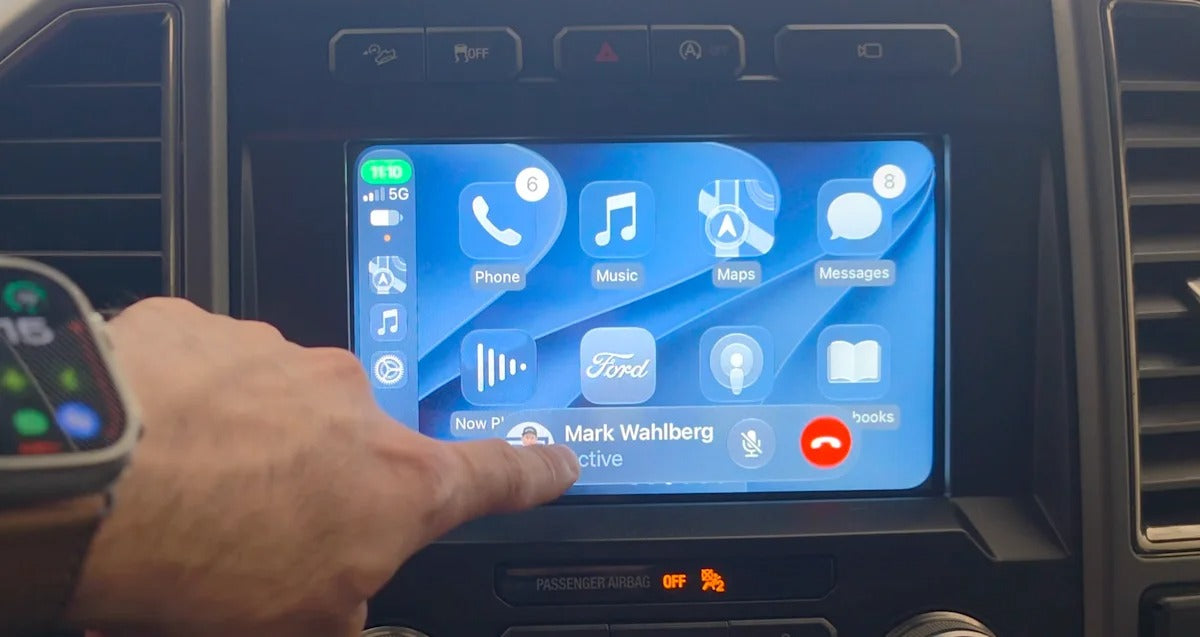
Apple's iOS 27 update brings one of the biggest CarPlay updates in years, adding new customization options, improved Maps features, widgets, audio controls, and several other changes.
But there's one improvement that could matter more than all the visual changes combined: Apple says wireless CarPlay is now more reliable.
That sounds great on paper. But does iOS 27 actually make wireless CarPlay more stable in everyday use?
Early reports suggest the answer is a little more complicated.
Apple Says Wireless CarPlay Is More Reliable
With iOS 27, Apple has made changes designed to improve the reliability of wireless CarPlay connections. Apple also says the update improves GPS accuracy and navigation heading detection.
Unlike some of the new CarPlay features introduced with iOS 27, these improvements don't require a new vehicle or special infotainment hardware. They are handled on the iPhone side.
That means if your car already supports wireless CarPlay, updating your iPhone to iOS 27 should be enough to benefit from the improvements.
At least, that's the idea.
So, Is Wireless CarPlay Actually Better?
Early experiences from users are mixed.
Some drivers report that wireless CarPlay connects normally and remains stable, while others are still seeing slow connection times, occasional failures, or other connection problems after upgrading to iOS 27.
This is particularly interesting because Apple's claim is specifically about reliability. If you have been using wireless CarPlay for years without problems, you may not notice a dramatic difference at all.
On the other hand, drivers who regularly experienced connection delays or dropped CarPlay sessions may notice improvements.
There is also another important variable: the car itself.
Wireless CarPlay isn't controlled entirely by the iPhone. Your vehicle's infotainment system, Bluetooth implementation, Wi-Fi connection, firmware, and even how the manufacturer implemented CarPlay can all affect the experience.
So two cars running the same iPhone and iOS version can behave very differently.
iOS 27 Doesn't Magically Fix Every CarPlay Problem
It's worth separating Apple's wireless CarPlay improvements from general CarPlay connection problems.
For example, if your iPhone doesn't connect to CarPlay at all, the problem could still be caused by:
- Your vehicle's infotainment software
- An old CarPlay pairing
- Bluetooth or Wi-Fi settings
- A problematic USB connection
- VPN or network-related settings
- An aftermarket CarPlay system
- Outdated vehicle firmware
- Compatibility issues with a particular iPhone
In other words, updating to iOS 27 shouldn't be treated as a universal CarPlay repair.
Apple itself recommends checking the connection, ensuring Bluetooth and Wi-Fi are enabled for wireless CarPlay, and rechecking vehicle compatibility when CarPlay isn't working correctly.
What About Older Cars?
This is where things get particularly interesting for older vehicles.
If your car already has factory wireless CarPlay, iOS 27's improvements should apply without requiring new hardware.
But what if your car only supports wired CarPlay?
An iOS update can't turn a wired-only CarPlay system into a wireless one.
That's where a wireless CarPlay adapter can make a difference.
A wireless adapter connects to the vehicle's existing wired CarPlay USB port and creates a wireless connection between the car and your iPhone.
Once configured, you can leave your iPhone in your pocket and have CarPlay connect automatically when you start the vehicle.
For drivers who don't want to replace their factory infotainment system, this can be a much simpler upgrade.
How to Get the Most Reliable Wireless CarPlay Experience
If you're running iOS 27 and experiencing connection problems, there are a few things worth checking before blaming the update.
1. Restart Your iPhone and Car
It sounds obvious, but restarting both sides of the connection can resolve temporary Bluetooth and Wi-Fi issues.
2. Forget Your Existing CarPlay Connection
Go to:
Settings → General → CarPlay
Select your vehicle and choose Forget This Car.
Then pair the vehicle again from scratch.
This can help if an old CarPlay pairing survived an iOS update and is causing connection problems.
3. Check Bluetooth and Wi-Fi
Wireless CarPlay relies on wireless communication between your iPhone and the vehicle.
Make sure both Bluetooth and Wi-Fi are enabled on your iPhone.
4. Check for Vehicle Software Updates
If your manufacturer offers an infotainment software update, install it.
An iPhone running the newest version of iOS can't compensate for outdated vehicle firmware or an underlying infotainment bug.
5. Try Without a VPN
Some users have reported connection problems while using VPN configurations. If you're troubleshooting CarPlay, temporarily disabling a VPN is another simple test worth trying.
6. Test Another iPhone
If possible, connect another iPhone running iOS 27 to the same vehicle.
This can help determine whether the problem is specific to your iPhone or related to the vehicle's CarPlay implementation.
What We've Learned So Far
The important thing to remember is that iOS 27 does improve wireless CarPlay at the software level, but that doesn't necessarily mean every vehicle will suddenly have a perfect connection.
Apple has made the changes. The real-world experience still depends on the combination of your iPhone, vehicle, infotainment system, wireless implementation, and software.
And because iOS 27 is still relatively new, it may take additional updates before we know how significant the improvements really are across different vehicles.
For now, the evidence points toward an improvement rather than a complete solution.
The Bottom Line
Yes, iOS 27 should make wireless CarPlay more reliable. But don't expect it to eliminate every connection problem.
If your wireless CarPlay has always worked perfectly, you probably won't notice a revolutionary difference.
If you've experienced random disconnects, slow connections, or unreliable startup behavior, iOS 27 is worth installing and testing.
And if your vehicle only supports wired CarPlay, the update won't change that. A wireless CarPlay adapter remains one of the easiest ways to add wireless connectivity without replacing your factory infotainment system.
As more drivers spend time with iOS 27, we'll get a much clearer picture of whether Apple's wireless CarPlay improvements represent a meaningful upgrade or simply a small refinement.
Share:
CarPlay Not Working With iPhone 18? Here’s How to Fix It
Waze Adds Sudden Slowdown Alerts to CarPlay and Android Auto