

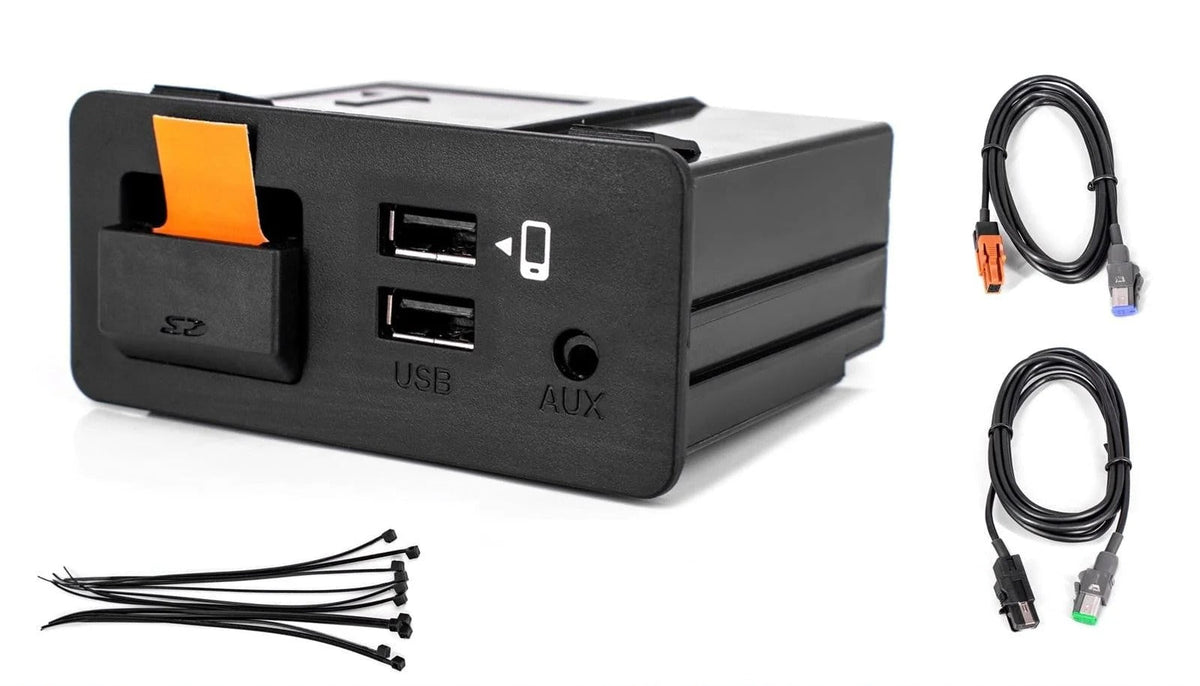
You've installed a CarPlay module in your vehicle, and everything looks perfect on the original screen, but there's no sound coming from your speakers. It's a common issue that can leave drivers wondering whether the module is faulty or something went wrong during installation.
In many cases, the explanation is simple: CarPlay video and audio may travel through different connections. While the module displays CarPlay on your factory screen, the audio may need to pass through your vehicle's original AUX input to reach the factory sound system.
At TheCarPlayer.com, we help customers integrate Apple CarPlay into their vehicles while retaining their original screens and factory features. In this guide, we'll explain why some CarPlay modules require an AUX connection, which vehicles may be affected, and how to troubleshoot audio problems after installation.
How Does a CarPlay Module Work?
A retrofit CarPlay module adds Apple CarPlay functionality to a vehicle's existing infotainment system. Depending on the vehicle and module, it can enable wireless or wired CarPlay while allowing you to continue using the factory screen and, in many cases, the original controls.
However, video and audio don't necessarily follow the same route.
-
Video: The module sends the CarPlay interface to the factory display through the vehicle-specific video connection.
-
Audio: Depending on the vehicle's infotainment system and module configuration, sound may be routed through the AUX input or another supported audio connection.
-
Controls: The factory touchscreen, steering-wheel buttons, or iDrive and MMI controllers may continue to operate CarPlay, depending on the vehicle.
This is why a CarPlay interface can appear on your screen even when music, navigation instructions, or call audio isn't working.
Why Do Some CarPlay Modules Use the AUX Input?
The AUX input provides an analogue audio connection to the vehicle's original sound system. When a CarPlay module uses this connection, it sends audio to the factory infotainment system, which then plays it through the vehicle's speakers.
This approach allows the module to add smartphone audio without replacing the original head unit, amplifier, or speakers.
It also helps preserve the vehicle's factory interior and existing audio equipment.
However, the AUX input must be available, correctly connected, and selected or activated where necessary. If the vehicle's AUX source is disabled, missing, or incorrectly configured, you may see the CarPlay interface but hear no sound.
Important: Not every CarPlay module uses AUX. Some systems route audio through other factory connections or integrate directly with the original infotainment system. The correct solution depends on your vehicle, its infotainment system, and the specific module installed.
Which Vehicles May Require an AUX Connection?
Certain vehicle configurations are more likely to require attention to the AUX input when installing an aftermarket CarPlay interface.
Examples include:
-
Mercedes-Benz with NTG5.X: Some configurations may require the AUX source to be enabled and selected for audio playback.
-
BMW with EVO infotainment systems: Depending on the vehicle and module, audio may be routed through the factory AUX input or another supported audio path.
-
Peugeot and Citroën with SMEG systems: Audio configuration and available connections can vary by model and equipment.
-
Volkswagen: Requirements differ between infotainment generations and vehicle configurations.
These are examples, not a definitive list of vehicles that require an AUX connection. Even two vehicles of the same model and year can have different infotainment equipment.
Before purchasing an adapter or changing any settings, verify the audio requirements for your specific vehicle and CarPlay module.
How to Fix CarPlay Audio When the Screen Works but There's No Sound
If CarPlay displays correctly but produces no audio, work through these checks before assuming the module is defective.
1. Check the selected audio source
Open your vehicle's original infotainment menu and check whether AUX is available as an audio source. If your module uses AUX, select it and test music or navigation instructions again.
On some systems, the AUX source must be enabled in the vehicle's settings before it becomes available.
2. Check the audio connections
Verify that any required AUX cable or audio connector is connected correctly. If your installation uses a vehicle-specific harness, check that all connectors are fully seated and that the wiring matches the module's installation instructions.
Avoid disconnecting or modifying unfamiliar wiring without confirming its purpose.
3. Determine whether your vehicle supports AUX
Some vehicles have a physical AUX socket that isn't enabled, while others may lack a usable AUX input altogether.
If the input is present but disabled, the solution may involve enabling it through the appropriate vehicle settings or diagnostic procedure. If no usable input exists, a compatible alternative audio connection may be necessary.
4. Consider a compatible USB-to-AUX adapter
For supported vehicle and module configurations, a USB-to-AUX adapter can provide an alternative way to connect audio to the factory sound system.
However, a USB-to-AUX adapter is not universally compatible with every vehicle or USB port. A standard USB port does not automatically become an analogue AUX output simply by connecting an adapter. The adapter must be designed to work with the relevant vehicle and audio configuration.
Before ordering one, confirm that it supports your particular infotainment system and CarPlay module.
5. Contact your module supplier
If the audio still doesn't work, contact your supplier with your vehicle's model year, infotainment system, and a description of the problem. Photos of the connections can also help identify a missing cable or an installation issue.
A compatible module should be configured according to the requirements of your specific vehicle.
Does Using AUX Affect Audio Quality?
A properly installed AUX connection can deliver good audio quality through the original speakers and amplifier. The final result depends on the vehicle's audio hardware, the quality of the connection, and the source signal.
AUX is an analogue connection, so audio quality may differ from a digital audio path. Nevertheless, it can be an effective solution for integrating CarPlay without replacing the factory infotainment system.
Why Vehicle Compatibility Matters
CarPlay retrofit modules are designed around particular factory infotainment systems, not just vehicle brands.
For example, two BMW models may use different head units, and a Mercedes-Benz model may have different infotainment generations depending on its production year and equipment.
That is why checking compatibility before installation is important. At TheCarPlayer.com, we recommend confirming the vehicle configuration before choosing a module or an additional audio adapter.
If you're unsure which solution your vehicle requires, contact our support team with your VIN, a photo of your original infotainment screen, and details of the audio problem. This helps us identify the correct configuration and avoid unnecessary purchases.
Frequently Asked Questions
Why does my CarPlay module display the image but produce no sound?
The module's video connection may be working correctly while the audio connection is not. If the module relies on AUX, the source may be disabled, the cable may be disconnected, or the vehicle may require an alternative audio solution.
Do all CarPlay modules require an AUX connection?
No. Some modules use AUX for audio, while others use different connections or integrate with the vehicle's original infotainment system. Always check the requirements of your specific module.
Will a USB-to-AUX adapter fix my CarPlay audio problem?
It may help if the adapter is compatible with your vehicle and module. A generic USB-to-AUX adapter will not necessarily work because USB ports and audio interfaces differ between systems.
Can I activate AUX myself?
Sometimes. On certain vehicles, AUX can be enabled through the original infotainment settings. Others may require diagnostic coding or a different audio connection. The correct procedure depends on the vehicle.
Will an AUX connection affect my original speakers or infotainment system?
When correctly installed and configured, an AUX connection uses the existing audio system to play sound through the factory speakers. It does not normally require replacing the speakers or original screen.
What information should I provide if my CarPlay module has no sound?
Provide your vehicle's make, model, production year, infotainment system if known, and photos of the installation connections. This information can help determine whether the problem is related to AUX activation, wiring, configuration, or module compatibility.
Get Your CarPlay Audio Working Correctly
When a CarPlay module displays correctly but produces no sound, the issue may be as simple as selecting the correct audio source or checking a connection. In other cases, the vehicle may need AUX activation or a compatible alternative audio solution.
The key is to identify how your particular module sends audio to the factory sound system before purchasing additional hardware or modifying the installation.
At TheCarPlayer.com, our goal is to help you enjoy Apple CarPlay while retaining your vehicle's original screen and factory functionality. If you need help identifying the right module or resolving an installation issue, contact our support team for assistance.
Share:
LVDS Cables and Apple CarPlay: The Small Component That Makes a Big Difference