

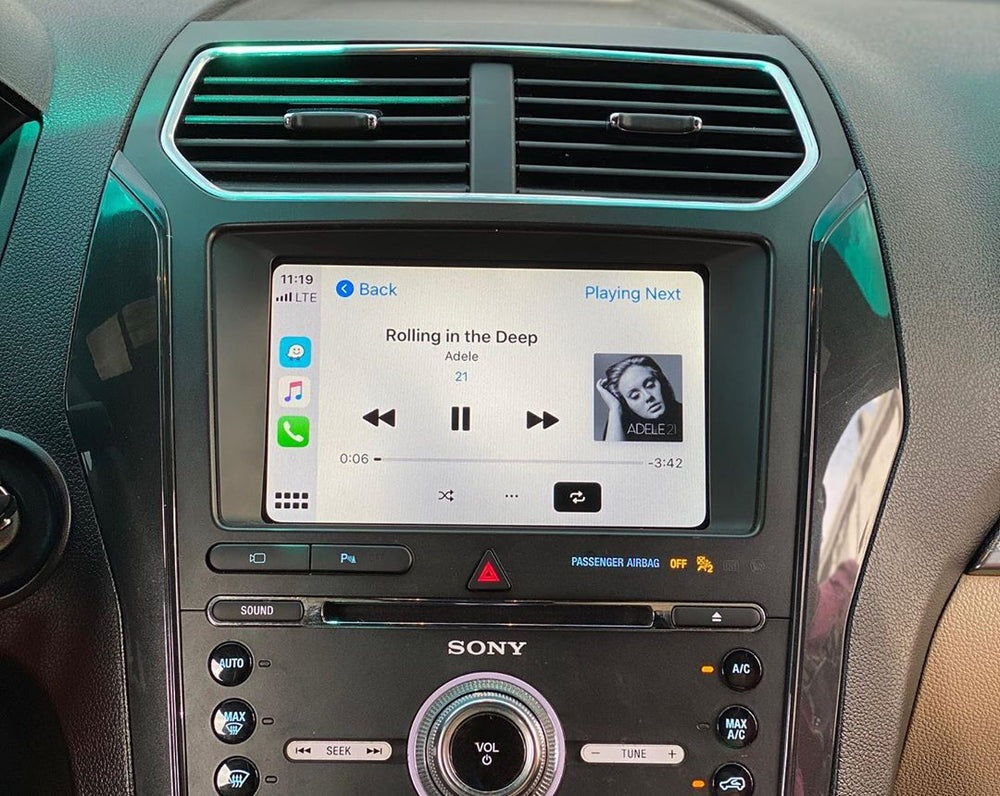
If you drive a Ford Explorer from 2011 to 2016, chances are it’s equipped with SYNC 2—a reliable infotainment system that, unfortunately, feels outdated today. No native Apple CarPlay, limited navigation, and a clunky interface can take away from an otherwise excellent SUV.
The good news? You don’t need to replace the screen or the entire head unit. With a dedicated Apple CarPlay module for Ford SYNC 2, you can seamlessly upgrade your Explorer and enjoy modern apps like Waze, Google Maps, Spotify, Apple Music, and Siri directly on the factory display.
At TheCarPlayer.com, we specialize in safe, vehicle-specific CarPlay retrofit solutions. This guide explains everything you need to know.
Why Install Apple CarPlay in a Ford Explorer?
Apple CarPlay isn’t just a convenience feature—it’s a major usability and safety upgrade.
Key benefits:
-
Hands-free driving – Control calls, messages, and apps using Siri or steering wheel buttons
-
Modern navigation – Use Waze, Google Maps, or Apple Maps with real-time traffic updates
-
Better media experience – Spotify, Apple Music, podcasts, and audiobooks on the original screen
-
Factory look preserved – No aftermarket screens or dashboard modifications
-
Increased vehicle value – A modern infotainment system makes your Explorer feel years newer
Step 1: Check Compatibility (SYNC 2 Only)
This upgrade is designed specifically for Ford Explorer models with SYNC 2, most commonly found in vehicles built between 2011 and 2016.
How to identify SYNC 2:
-
Turn on the infotainment system
-
Look at the home screen
-
SYNC 2 displays four colored tiles:
-
Phone
-
Navigation
-
Entertainment
-
Climate
-
If your system looks like this, your Explorer is compatible.
Note: SYNC 3 vehicles already support CarPlay natively and do not require a module.
Step 2: What You Need for Installation
The installation is fully plug-and-play and does not require cutting or coding.
Required items:
-
Apple CarPlay module for Ford Explorer SYNC 2 (vehicle-specific)
-
Basic tools (Phillips screwdriver)
-
Plastic trim removal tools (recommended)
-
Your vehicle’s VIN number (used for configuration)
The module acts as a bridge between your iPhone and the SYNC 2 system, while retaining all original Ford functions.
Step 3: Step-by-Step Installation Guide

Take your time and follow the steps carefully.
1. Remove the SYNC 2 Screen
-
Carefully remove the dashboard trim around the screen using plastic tools
-
Unscrew the mounting screws
-
Gently pull the screen forward to access the connectors
2. Connect the CarPlay Module
-
Disconnect the factory connectors from the back of the screen
-
Plug the supplied wiring harness into the original screen
-
Connect the other end to the vehicle’s factory plugs
-
Attach the CarPlay module to the harness
All connectors are keyed—there’s no risk of incorrect installation.
3. Install the Wi-Fi Antenna and Microphone
-
Mount the Wi-Fi antenna behind the dashboard for wireless CarPlay
-
If included, install the external microphone near the A-pillar or steering column for optimal Siri performance
4. Test Before Reassembly
-
Turn on the ignition
-
Activate CarPlay by pressing and holding the NAV or VOICE button (varies by module)
-
Connect your iPhone via USB or wirelessly
-
Test navigation, audio, calls, and steering wheel controls
Once confirmed, reassemble the dashboard.
Advanced Features You’ll Get
A proper CarPlay retrofit offers more than basic screen mirroring.
Included features:
-
Wireless Apple CarPlay
-
Android Auto support (for Android users)
-
Full steering wheel control integration
-
OEM screen & buttons retained
-
Reverse camera and front camera compatibility
Everything works seamlessly with the original Ford interface.
Why Choose a CarPlay Module from TheCarPlayer.com?
Not all CarPlay solutions are equal. Poor-quality modules and incorrect installations can lead to system errors, freezes, or compatibility issues.
At TheCarPlayer.com, our Ford Explorer SYNC 2 CarPlay modules are:
-
Vehicle-specific and fully tested
-
Plug-and-play (no coding, no soldering)
-
Compatible with factory cameras and controls
-
Designed for long-term stability
Conclusion: Give Your Ford Explorer a Second Life
Installing Apple CarPlay in your Ford Explorer (2011–2016) is one of the most effective upgrades you can make. You keep the original hardware, gain modern functionality, and dramatically improve daily driving comfort.
Instead of using phone mounts or outdated navigation, enjoy a clean, factory-style CarPlay experience every time you start the engine.
For a reliable, tested solution, explore the Ford SYNC 2 Apple CarPlay modules available at TheCarPlayer.com and bring your Explorer up to modern standards.
Share:
Red Screen on VW & Seat Infotainment: Causes, Fixes, and Proven Solutions
Complete Guide: How to Connect and Use Apple CarPlay in Your Volkswagen Taigo