

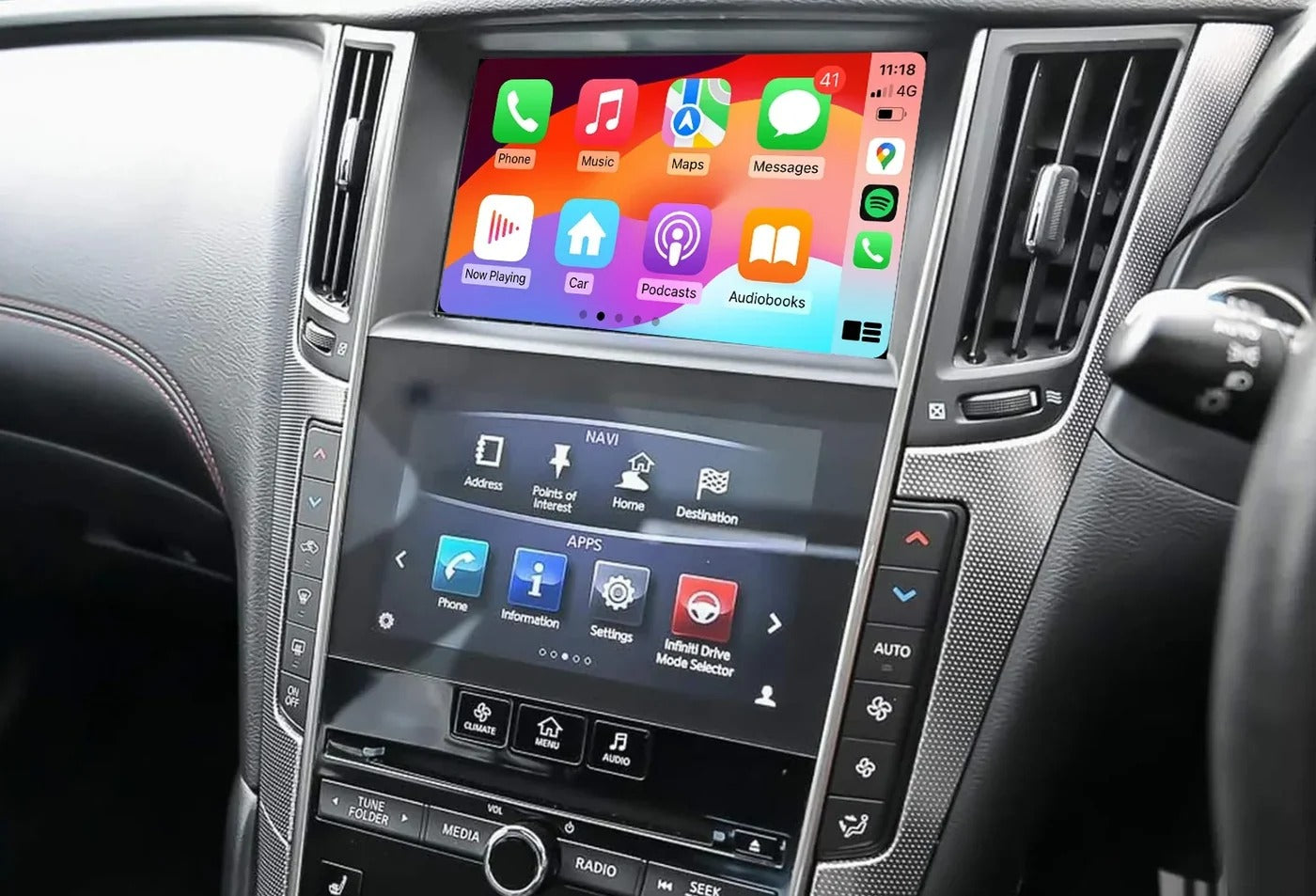
Your Infiniti may still be an excellent car, but the factory infotainment system can feel outdated when it comes to modern smartphone connectivity.
If you're driving an Infiniti Q50, Q50L, QX50 or Q60 and want to use Apple CarPlay, you don't necessarily need to replace the factory screen or install a generic aftermarket head unit.
With a compatible plug-and-play CarPlay interface from TheCarPlayer, you can upgrade your original infotainment system with modern smartphone features while keeping the factory screen and original interior appearance.
Enjoy convenient access to:
- Wireless Apple CarPlay
- Android Auto
- Waze
- Google Maps
- Apple Maps
- Spotify
- Apple Music
- Hands-free calls
- Siri and voice control
- Compatible messaging and audio apps
All of this can be added while preserving the functionality of your original Infiniti system.
Can You Add Apple CarPlay to an Infiniti Q50, QX50 or Q60?
Yes. A compatible CarPlay retrofit module can add Apple CarPlay and Android Auto to supported Infiniti factory infotainment systems.
The module is designed to integrate with the vehicle's existing system rather than replacing it entirely. This means you can modernize your infotainment experience without changing the factory screen or installing an aftermarket dashboard display.
For many Infiniti owners, this is the preferred solution because it provides modern connectivity while maintaining the original OEM appearance of the interior.
Why Choose a Plug-and-Play CarPlay Module?
Replacing the entire factory infotainment system can be expensive and may require extensive modifications to the dashboard.
A dedicated CarPlay retrofit module offers a different approach.
The interface connects to the existing Infiniti infotainment system and allows the factory display to be used for Apple CarPlay and Android Auto.
Keep Your Original Screen
There is no need to remove and replace the factory display with an aftermarket touchscreen.
No Dashboard Modifications
A compatible retrofit module is designed to connect to the vehicle's existing system without unnecessary cutting or permanent modifications.
Preserve the OEM Look
Your Infiniti keeps its original interior design while gaining modern smartphone functionality.
Keep Access to the Factory System
The original Infiniti infotainment menu remains available, allowing you to continue using the vehicle's factory features.
How Does the Infiniti CarPlay Retrofit Work?
The CarPlay interface is installed between the factory infotainment system and the original display.
Rather than replacing the Infiniti's existing hardware, the module adds an additional interface that allows you to access CarPlay when needed.
The basic setup works like this:
Factory Infiniti infotainment system → CarPlay interface → Original factory screen
You can continue using the original Infiniti system and switch to the CarPlay interface to access your compatible iPhone or Android smartphone applications.
This gives you the benefits of modern connectivity without completely changing the car's original infotainment setup.
Wireless Apple CarPlay for Your Infiniti
One of the biggest advantages of upgrading your Infiniti is the convenience of wireless Apple CarPlay.
After the initial pairing process, your compatible iPhone can connect to the system automatically when you enter the vehicle.
That means you can access your favorite navigation, music and communication apps without connecting your phone with a cable every time you drive.
With wireless CarPlay, you can use:
Navigation
- Apple Maps
- Google Maps
- Waze
Get real-time traffic information and navigate using the apps you already use on your iPhone.
Music and Audio
Access compatible apps such as:
- Spotify
- Apple Music
- Podcasts
- YouTube Music
Calls and Messages
Make and receive calls hands-free and use Siri to interact with compatible communication apps.
Siri Voice Control
Ask Siri to play music, make a call or start navigation without taking your hands off the wheel.
Android Auto Is Also Available
Don't use an iPhone? A compatible module can also support Android Auto, allowing Android users to access compatible apps directly through the Infiniti's original display.
This makes the upgrade a practical solution regardless of whether you use an iPhone or an Android smartphone.
Will I Lose My Original Infiniti Menu?

No.
This is one of the most important advantages of a properly integrated CarPlay retrofit.
The CarPlay interface is designed to work alongside the existing infotainment system rather than permanently replacing it.
Your original Infiniti menu remains available, and you can continue using the vehicle's factory features.
Depending on your exact vehicle configuration, supported functionality can include:
- Original infotainment menus
- Factory audio system
- Steering wheel controls
- Factory reversing camera
- Other original vehicle functions
You gain access to Apple CarPlay and Android Auto without unnecessarily sacrificing the features already built into your Infiniti.
Do the Steering Wheel Controls Still Work?
A compatible retrofit interface is designed to integrate with the vehicle's existing controls.
Depending on the Infiniti model and factory infotainment configuration, you may be able to use the original controls to operate supported CarPlay functions, including music, calls and voice commands.
This provides a more natural experience than using a completely separate aftermarket system.
What About the Factory Reversing Camera?
If your Infiniti is equipped with a factory reversing camera, a properly compatible retrofit system is designed to preserve this functionality.
When reverse gear is selected, the factory camera can continue to operate as intended.
If your vehicle does not have a reversing camera, contact TheCarPlayer to discuss compatible camera options for your setup.
How Difficult Is Installation?
The installation process depends on the exact Infiniti model and factory infotainment system.
The module is designed as an OEM-style retrofit solution and uses the vehicle's existing connections, avoiding unnecessary modifications to the dashboard.
However, we always recommend confirming compatibility before ordering.
To help us identify the correct solution for your vehicle, send us:
- Your Infiniti model
- Model year
- A photo of the factory screen while it is switched on
- Any relevant system information, if available
Our team can then help check compatibility and determine which module is suitable for your vehicle.
Infiniti Models We Can Check for Compatibility
This type of CarPlay retrofit solution is intended for selected Infiniti configurations, including:
- Infiniti Q50
- Infiniti Q50L
- Infiniti QX50
- Infiniti Q60
Compatibility can depend on the model year, factory screen and infotainment system installed in the vehicle.
For that reason, please don't order based solely on the vehicle name or model year.
Send us a photo of your Infiniti's factory screen while it is turned on, and we'll help you check compatibility before you order.
Why Upgrade Instead of Replacing the Entire Infotainment System?
A complete aftermarket screen replacement may seem like the easiest way to get modern technology, but it can come with several disadvantages.
Depending on the installation, replacing the original system can:
- Change the appearance of the dashboard
- Require additional modifications
- Affect the integration of factory controls
- Create compatibility issues with original features
- Result in an aftermarket look that doesn't match the vehicle's interior
A dedicated CarPlay interface takes a more OEM-friendly approach.
Keep the original screen. Add the technology you actually want.
For Infiniti owners who want modern smartphone connectivity without changing the character of the vehicle's interior, this can be an ideal solution.
What to Check Before Buying an Infiniti CarPlay Module
Before ordering, make sure you confirm the following:
1. Your Exact Infiniti Model
Confirm whether you have a Q50, Q50L, QX50 or Q60.
2. Model Year
Different model years may use different infotainment hardware.
3. Your Factory Screen
A clear photo of the screen while it is turned on can help identify the system.
4. Factory Features
Let us know if your vehicle has features such as a factory reversing camera or other equipment that needs to be retained.
5. Your Phone
Let us know whether you use an iPhone for Apple CarPlay or an Android phone for Android Auto.
The more information you provide, the easier it is to identify the correct solution before ordering.
Frequently Asked Questions
Can I add Apple CarPlay to my Infiniti without replacing the factory screen?
Yes. A compatible retrofit module can add Apple CarPlay while retaining the original Infiniti display and infotainment system.
Does Apple CarPlay work wirelessly?
Compatible modules can support wireless Apple CarPlay, allowing your iPhone to connect without plugging in a cable for everyday use.
Can I use Waze and Google Maps?
Yes. Once connected through Apple CarPlay, you can use compatible navigation apps such as Waze, Google Maps and Apple Maps.
Does the module also support Android Auto?
Compatible solutions can support Android Auto for Android smartphones as well as Apple CarPlay for iPhone users.
Will I lose my original Infiniti menu?
No. The purpose of a retrofit interface is to add modern smartphone functionality while preserving access to the original infotainment system.
Will my steering wheel controls still work?
Supported factory controls are designed to remain integrated, although functionality can depend on your exact Infiniti model and infotainment configuration.
Will my reversing camera still work?
If your vehicle has a compatible factory camera, the retrofit solution is designed to preserve its original operation. Compatibility should always be confirmed for your specific vehicle.
How long does installation take?
Installation time depends on the exact vehicle and infotainment configuration. The module uses the existing system connections and is designed to avoid unnecessary modifications, but we recommend reviewing the installation requirements before beginning.
How do I know which CarPlay module my Infiniti needs?
The easiest way is to send TheCarPlayer a photo of your factory screen while it is turned on, along with your model and model year. We can then help check compatibility before you order.
Upgrade Your Infiniti With Modern Smartphone Connectivity
You don't need to replace your Infiniti's factory screen to enjoy modern navigation, music streaming and hands-free smartphone features.
With the right CarPlay retrofit solution, you can keep the original look of your vehicle while adding the technology you use every day.
Upgrade your Infiniti with:
- Wireless Apple CarPlay
- Android Auto
- Waze, Google Maps and Apple Maps
- Spotify and other compatible music apps
- Hands-free calls
- Siri voice control
- Access to your original factory system
Not sure if your Infiniti is compatible?
Send TheCarPlayer a photo of your factory screen while it is switched on, along with your vehicle model and year, and we'll help you identify the right solution.
Share:
How to Add Apple CarPlay to a Ferrari California T
Will the iPhone Ultra Be Compatible With Apple CarPlay?