

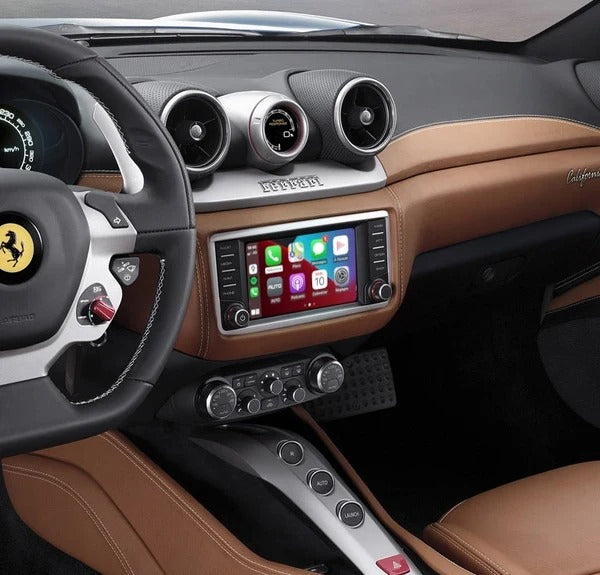
The Ferrari California T is still an exceptional car, but its factory infotainment system can feel noticeably dated compared with the technology available in modern cars.
Fortunately, you don't need to replace the factory screen or install a generic aftermarket head unit to get Apple CarPlay.
A dedicated CarPlay retrofit module can integrate with the original Ferrari infotainment system, allowing you to use wireless Apple CarPlay while keeping the factory display and interior appearance.
Can You Add Apple CarPlay to a Ferrari California T?
Yes. A Ferrari California T can be upgraded with an Apple CarPlay retrofit system without replacing the original infotainment screen.
This is particularly useful for owners who want modern smartphone functionality while keeping the Ferrari's original interior and controls.
Depending on the configuration, a retrofit module can provide:
- Wireless Apple CarPlay
- Android Auto
- Music and audio streaming
- Google Maps
- Apple Maps
- Waze
- Siri voice control
- Hands-free phone calls
- Access to compatible messaging apps
- Steering-wheel control integration
The important part is choosing a module designed specifically for the Ferrari's original infotainment system rather than installing a generic aftermarket stereo.
Why Retrofit CarPlay Instead of Replacing the Ferrari's Screen?
Replacing the original Ferrari infotainment system with an aftermarket touchscreen might seem like the obvious solution, but it comes with several disadvantages.
The factory Ferrari interior is designed around its original equipment. An aftermarket head unit can look out of place and may require significantly more modification.
A retrofit module takes a different approach.
Keep the Original Ferrari Screen
The factory display remains in place.
Keep the Original Interior
There is no need to install a large aftermarket touchscreen that changes the appearance of the dashboard.
Keep the Factory Controls
The retrofit can work with the vehicle's existing controls, depending on the configuration.
Add Modern Smartphone Connectivity
You get the functionality you actually want—Apple CarPlay—without replacing the entire infotainment system.
For an exotic car such as the Ferrari California T, preserving the original appearance is particularly important.
How Does a Ferrari California T CarPlay Retrofit Work?
A CarPlay retrofit module is installed behind the factory infotainment system.
Instead of replacing the Ferrari's original screen, the module interfaces with the existing infotainment hardware.
The basic process is:
Factory Ferrari system → CarPlay interface → Factory display
When you start the car, the original system remains available. When you connect your iPhone, the CarPlay interface can be accessed through the factory screen.
This means you can modernize the technology without turning the Ferrari's dashboard into an aftermarket installation.
What Can You Do With Apple CarPlay?
Once installed, your Ferrari can use your iPhone for many of the functions that drivers expect from a modern infotainment system.
Navigation
Use:
- Apple Maps
- Google Maps
- Waze
Instead of relying exclusively on the Ferrari's original navigation system, you can use navigation data from your phone.
This also means your maps and destinations are continuously updated through your smartphone.
Music
Listen to your favorite music through apps such as:
- Apple Music
- Spotify
- YouTube Music
- Podcasts
Your phone remains connected wirelessly, so you don't need to constantly plug it into the Ferrari.
Phone Calls
Make and receive calls using the Ferrari's existing interface and controls where supported.
Siri can also be used to initiate calls without taking your hands off the wheel.
Siri
With Siri, you can control many CarPlay functions using your voice.
For example:
"Navigate to the nearest gas station."
or
"Play my driving playlist."
This makes interacting with your phone considerably safer and more convenient while driving.
Wireless CarPlay vs. Wired CarPlay
One of the biggest advantages of a modern retrofit module is wireless Apple CarPlay.
With a traditional wired CarPlay system, you need to connect your iPhone to the car using a USB cable every time you want to use CarPlay.
Wireless CarPlay eliminates that extra step.
Once your phone has been paired with the system, CarPlay can connect automatically when you start the car.
Wireless CarPlay is especially useful in a Ferrari
You bought a Ferrari California T to enjoy driving—not to have a USB cable hanging across the center console.
Wireless connectivity keeps the cabin cleaner and makes the system feel much more like a modern factory infotainment system.
Do You Need to Replace the Ferrari Factory Screen?
No.
That's one of the main advantages of using a dedicated retrofit interface.
The original Ferrari display can remain installed.
This is also why it is important to choose the correct module for your exact Ferrari infotainment configuration rather than buying a universal CarPlay device.
What About the Ferrari's Original Controls?
A properly integrated retrofit system is designed to work with the vehicle's existing controls wherever supported.
This means you can typically continue using the factory controls to navigate the CarPlay interface rather than adding a separate aftermarket controller.
This is one of the major differences between a proper OEM-style retrofit and a generic aftermarket touchscreen.
Is Installing CarPlay on a Ferrari California T Complicated?
The installation involves accessing the factory infotainment system and connecting the retrofit interface to the appropriate factory connections.
The exact installation procedure depends on the vehicle's equipment and infotainment configuration.
For this reason, we recommend confirming compatibility before ordering.
If you're unsure which system your Ferrari has, simply send us a photo of the factory screen while it is switched on.
Our team can use the screen and vehicle information to help identify the correct solution.
What Should You Check Before Buying?
Before ordering a CarPlay retrofit for your Ferrari California T, check:
1. The vehicle
Confirm that you have a Ferrari California T and provide the model year.
2. The factory screen
Take a clear photograph of the infotainment screen while the system is turned on.
3. The factory infotainment system
Different Ferrari configurations can use different hardware, so compatibility should be confirmed before installation.
4. Existing connections
Some configurations can have different factory equipment, so providing photos is useful when determining compatibility.
Not sure? Don't guess. Send us a photo and we'll help you identify the correct system.
Why Choose a Dedicated Ferrari CarPlay Module?
A Ferrari deserves a solution designed around the vehicle—not a generic tablet-style screen.
A dedicated retrofit module lets you modernize the California T while maintaining the character of the original Ferrari interior.
Instead of:
Remove factory screen → modify dashboard → install aftermarket stereo
you can take the more OEM-friendly approach:
Keep factory screen → install retrofit interface → add modern CarPlay functionality
That means you get the technology you want without unnecessarily changing the car you already love.
Frequently Asked Questions
Can I add wireless Apple CarPlay to a Ferrari California T?
Yes. A compatible CarPlay retrofit module can add wireless Apple CarPlay to the factory infotainment system.
Do I have to replace the factory Ferrari screen?
No. The purpose of a retrofit interface is to add CarPlay while retaining the original display.
Will the Ferrari's original interior remain unchanged?
Yes. A retrofit module is designed to preserve the factory appearance rather than replacing the dashboard with an aftermarket touchscreen.
Can I use Google Maps and Waze?
Yes. Compatible navigation applications such as Google Maps, Apple Maps and Waze can be used through Apple CarPlay.
Can I use Spotify?
Yes. Spotify and other compatible audio applications can be accessed through CarPlay.
Do I need to connect my iPhone with a cable?
With a wireless CarPlay-compatible module, no cable is required for normal CarPlay use once the phone has been paired.
Is the installation plug and play?
The exact installation depends on the Ferrari's factory configuration. The correct module uses the vehicle's existing connections and avoids unnecessary modifications, but compatibility should be confirmed before purchase.
How do I know which module I need?
The easiest way is to send us a photo of your Ferrari's factory infotainment screen while it is turned on, along with the vehicle year. We can then check which system is appropriate.
Upgrade Your Ferrari California T Without Changing Its Character
The Ferrari California T may have been designed before wireless smartphone connectivity became standard, but that doesn't mean you need to live with outdated infotainment.
A dedicated CarPlay retrofit gives you the best of both worlds:
Ferrari's original interior + modern smartphone technology.
Keep the factory screen, retain the original appearance and add the convenience of wireless Apple CarPlay, modern navigation, music streaming and hands-free smartphone functionality.
Ready to upgrade your Ferrari California T?
Check Ferrari California T CarPlay Compatibility →
Not sure which system your Ferrari has?
Send us a photo of the factory screen while it is turned on, and we'll help you determine compatibility before you order.
Share:
Front Camera for Your Car: Why You Need One and How It Works with CarPlay
How to Add Wireless Apple CarPlay to an Infiniti Q50, QX50 or Q60