

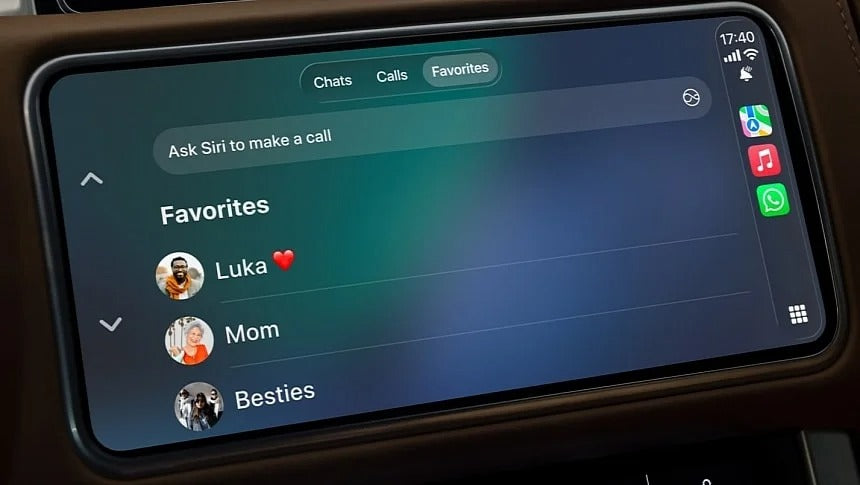
WhatsApp is expanding its in-car experience with a dedicated interface for Android Auto and Apple CarPlay, giving drivers easier access to messages, calls, and favorite contacts.
WhatsApp has been available on Android Auto and Apple CarPlay for years, but its integration has always been fairly limited. Drivers could use Google Assistant or Siri to send messages, listen to incoming texts, and reply without touching their phones.
Now, WhatsApp is taking things a step further with a dedicated in-car interface designed specifically for Android Auto and Apple CarPlay.
A Real WhatsApp Experience in Your Car
The new integration gives WhatsApp its own interface on your vehicle's infotainment screen instead of relying entirely on Google Assistant or Siri.
According to WhatsApp, users can:
- Hear and respond to messages
- Make WhatsApp calls
- View call history
- Access favorite contacts
- Start conversations directly from the car's display
The interface is designed around hands-free interaction, so you won't get a traditional keyboard for typing messages while driving. Instead, you can use Siri on CarPlay or Google Assistant on Android Auto to dictate your messages.
That's an important distinction: WhatsApp is adding a proper interface, but it isn't turning your car's screen into a smartphone.
WhatsApp Calls Come to the Dashboard
One of the more useful additions is easier access to WhatsApp calling.
The dedicated interface includes a call history section, allowing you to select a contact and start a WhatsApp call. Your vehicle's speakers and microphone handle the conversation, just like a normal hands-free call.
You can also access your favorite contacts directly, making it easier to call or message the people you communicate with most frequently.
How to Get WhatsApp on CarPlay and Android Auto
If you already have WhatsApp installed on your smartphone, there shouldn't be any complicated setup process.
Simply update WhatsApp to the latest version through:
- Apple App Store on iPhone
- Google Play Store on Android
Then connect your phone to your vehicle using Apple CarPlay or Android Auto.
Once the updated version is available for your account and vehicle, the new WhatsApp icon should appear on the Android Auto or CarPlay interface.
Because features can be rolled out gradually, some users may not see the new interface immediately even after updating the app.
A Useful Upgrade for Heavy WhatsApp Users
WhatsApp's previous CarPlay and Android Auto integration was functional, but it felt more like an extension of Siri or Google Assistant than a true WhatsApp experience.
The new interface changes that.
Being able to see your conversations, access call history, and quickly reach favorite contacts makes WhatsApp much more useful while driving—without requiring you to pick up your phone.
Of course, the system remains intentionally limited for safety reasons. You still won't be able to browse WhatsApp freely or type messages on your infotainment screen.
What's Next for WhatsApp on CarPlay?
It's unclear whether Meta plans to add additional features to the in-car WhatsApp experience.
For now, the new interface addresses one of the biggest limitations of WhatsApp on CarPlay and Android Auto: the lack of a dedicated visual interface.
For drivers who use WhatsApp every day, that's a welcome upgrade.
And if your vehicle doesn't support Apple CarPlay or Android Auto, you don't necessarily need to replace the entire infotainment system.
At TheCarPlayer, we offer plug-and-play CarPlay and Android Auto retrofit modules for a wide range of vehicles. These upgrades allow you to keep your factory screen, controls, and other original features while adding modern smartphone connectivity.
Your old infotainment system doesn't necessarily need to be replaced—it may just need an upgrade.
Share:
Apple CarPlay Black Screen After iOS 27? Here's How to Fix It
Front Camera for Your Car: Why You Need One and How It Works with CarPlay