

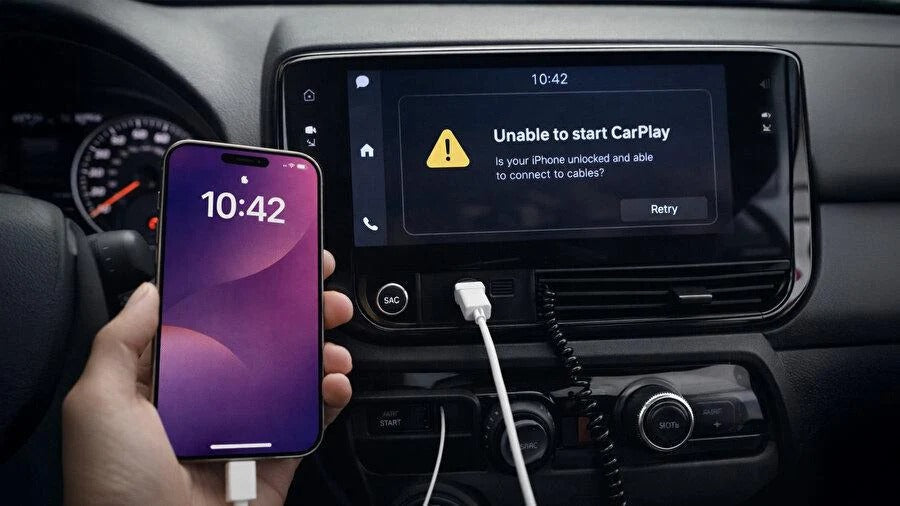
If your wired Apple CarPlay connection keeps disconnecting while you're driving, the problem is usually caused by one of three things: a faulty USB cable, a worn or dirty USB port, or an unstable physical connection.
The good news is that most of these issues are relatively easy to diagnose. Before replacing hardware or assuming there's a problem with your car's infotainment system, you can test the cable, USB port, and connection individually.
And if your vehicle supports wired CarPlay but you are tired of dealing with cables altogether, switching to wireless CarPlay with a dedicated adapter can be a much more convenient solution.
Why Does Wired CarPlay Disconnect While Driving?
Wired CarPlay depends on a continuous physical connection between your iPhone and your vehicle's infotainment system.
The USB connection carries both power and data, so even a brief interruption can cause CarPlay to disconnect, restart, or disappear from the vehicle's display.
This can be particularly frustrating when you're using navigation, listening to music, or taking a phone call.
The most common causes include:
1. A Faulty or Worn USB Cable
The USB cable is often the first thing you should check.
Cables are subjected to a lot of bending and movement, especially when they're plugged into a phone that's being used while driving. Internal damage can develop even when the cable looks perfectly normal from the outside.
A poor-quality or damaged cable may still charge your iPhone while having problems maintaining a stable data connection. Since CarPlay relies on data transmission, charging normally does not necessarily mean the cable is working correctly for CarPlay.
The easiest test is to try another high-quality data cable.
If CarPlay becomes stable immediately, you've found the problem.
2. A Dirty or Worn USB Port
The USB port in your vehicle can also cause intermittent CarPlay connections.
Dust, debris, worn contacts, or physical damage can prevent the cable from making a reliable connection. The problem may only appear when the vehicle is moving because vibrations can cause the connection to briefly break.
If your vehicle has another USB port that supports CarPlay, try it with the same cable.
If the second port works without interruptions, the original port may be the problem.
3. A Loose Connection
Sometimes neither the cable nor the USB port is completely faulty. The connection may simply be loose.
For example, the cable can be under tension because your phone is sitting in a holder, or the connector may move slightly when you drive over bumps.
If CarPlay disconnects particularly often on rough roads, speed bumps, or when the cable moves, this is a strong indication of a physical connection problem.
4. An iPhone or Infotainment System Software Issue
Not every CarPlay problem is caused by hardware.
Temporary iOS bugs, outdated software, or problems with the vehicle's infotainment system can also cause CarPlay to disconnect.
If you've already tested another cable and USB port, it's worth restarting both your iPhone and the vehicle's infotainment system and checking for available software updates.
How to Find Out What's Causing the Problem
Instead of immediately replacing parts, try these steps one at a time:
- Try another USB cable. Use a high-quality cable that supports data transfer and is known to work properly.
- Try another USB port. If your vehicle has multiple ports, make sure the second port supports CarPlay.
- Restart your iPhone and infotainment system. This can eliminate temporary software problems.
- Check for software updates. Update your iPhone and, where applicable, your vehicle's infotainment software.
- Pay attention to when the disconnection happens. If it happens mainly when the cable moves or the car hits a bump, suspect a physical connection problem.
- Test another iPhone if possible. If another iPhone works perfectly with the same cable and vehicle, the problem may be related to your phone or its USB-C/Lightning port.
If CarPlay continues disconnecting after you've tested different cables and ports, the problem may be somewhere in the vehicle's USB system or infotainment hardware.
The Alternative: Switch to Wireless CarPlay
If your vehicle already supports wired Apple CarPlay, you don't necessarily have to keep plugging your iPhone into the USB port every time you get in the car.
A wireless CarPlay adapter can convert compatible factory-wired CarPlay systems to wireless CarPlay.
Once installed, you can leave the adapter connected to the vehicle's USB port and your iPhone can connect to CarPlay wirelessly.
This eliminates the need to connect a USB cable to your phone every time you drive and also removes the cable itself as a potential source of intermittent connection problems.
Benefits of Wireless CarPlay
- No cable to connect every time you drive
- No cable hanging between your phone and the USB port
- Automatic wireless connection after initial setup
- Keeps the vehicle's original CarPlay interface
- No modification or coding required
- Quick plug-and-play installation
However, there's an important limitation: a wireless CarPlay adapter does not add CarPlay to a vehicle that doesn't already have it. Your car must already support factory wired Apple CarPlay.
Should You Replace the Cable or Go Wireless?
If your CarPlay problem is caused by a damaged USB cable, replacing the cable is the simplest and cheapest solution.
If the USB port itself is damaged or worn, however, replacing the cable won't solve the problem.
And if you simply don't want to deal with a USB cable every time you get in the car, a wireless CarPlay adapter is a convenient upgrade for vehicles that already support wired CarPlay.
For many drivers, the biggest advantage isn't just convenience. Removing the phone-to-car cable also eliminates one of the most common physical causes of intermittent CarPlay connections.
Frequently Asked Questions
Why does CarPlay disconnect when I drive over bumps?
This usually points to a physical connection problem. Movement or vibration can cause a loose USB connector or damaged cable to briefly lose contact.
Can a USB cable charge my iPhone but still not work properly with CarPlay?
Yes. Charging and data transfer are different functions. A cable can charge your iPhone while having an unstable or faulty data connection, which can cause CarPlay to disconnect.
Does a wireless CarPlay adapter work with every car?
No. The vehicle must already have factory wired Apple CarPlay. A wireless adapter converts an existing wired CarPlay connection to wireless; it does not add CarPlay to a vehicle that doesn't support it.
Will wireless CarPlay change my vehicle's original system?
A compatible wireless adapter normally uses the vehicle's existing CarPlay interface. It does not replace the vehicle's infotainment system or remove its original menus and functions.
Is wireless CarPlay completely cable-free?
Your iPhone no longer needs to be connected by cable, but the wireless adapter itself remains connected to the vehicle's USB CarPlay port.
Stop Fighting With the CarPlay Cable
Intermittent CarPlay disconnections are frustrating, but the cause is often simpler than it seems.
Start by testing the USB cable, then the USB port, and finally the iPhone and vehicle software. If the connection only fails when the cable moves or the car hits bumps, a loose or worn connection is particularly likely.
And if your vehicle already supports wired CarPlay but you want to eliminate the cable from your daily routine, wireless CarPlay is a simple upgrade worth considering.
For compatible vehicles, a wireless CarPlay adapter lets you keep the original CarPlay experience while connecting your iPhone without plugging in a cable every time you get behind the wheel.
Share:
Waze Adds Sudden Slowdown Alerts to CarPlay and Android Auto
Apple CarPlay Won’t Connect via Bluetooth or Wi-Fi? Here’s What to Check